
Comparison

VClar vs Descript: Which Is Better for Cleaning Up Spoken Audio?

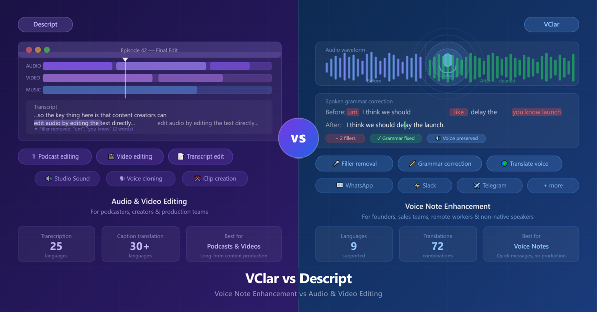
Descript and VClar both do something with your audio. They both remove filler words. They both use transcription under the hood.

They even overlap on a few surface-level features if you squint hard enough.

But they are built for completely different people trying to solve completely different problems.

The right choice in the VClar vs Descript debate really comes down to one question: are you editing a podcast or a voice message? The answer tells you almost everything.

Descript is a full audio and video editor built for creators, podcasters, and production teams. VClar is an AI voice message enhancer built for anyone who sends spoken messages on WhatsApp, Slack, Telegram, or any other platform and wants those messages to come out cleaner without re-recording them.

Quick answer

Choose Descript

If you record podcasts, videos, interviews, or long-form audio and video content that needs editing, captions, clipping, publishing, or production polish.

Choose VClar

If you send voice messages, spoken messages, or short audio recordings and want grammar fixed, filler words removed, and a cleaner version back in your own natural voice, without a learning curve or a project timeline.

VClar vs Descript comparison

What Is Descript?

Descript is an AI-powered audio and video editing platform built for content creators and production teams.

The core idea is clever: it transcribes your recording and then lets you edit the audio or video by editing the text. Delete a sentence from the transcript, and it disappears from your recording. Rearrange paragraphs, and your media follows.

That approach makes it genuinely powerful for people working with long-form content who want to avoid scrubbing through timelines.

Beyond text-based editing, Descript packs in a lot.

  • It removes filler words from both audio and video simultaneously.
  • It has Studio Sound, which cleans background noise and enhances audio quality with one click.
  • It has Overdub, which can clone your voice so you can fix a line just by typing.
  • It supports screen recording, AI-generated captions, B-roll suggestions, viral clip detection, and publishing tools.
  • Its AI co-editor, called Underlord, can make edits based on a simple prompt.

According to descript.com, Descript supports transcription in 25 languages and translation of transcripts and captions into 30 or more languages. It offers a free plan with basic features, and paid plans add voice cloning, longer projects, and team collaboration.

Descript is genuinely impressive software. But it is a creator tool, a production platform designed for people building a podcast, a YouTube channel, a branded video series, or professional media content.

It is not built for the kind of quick, spoken message someone sends at 7 pm while walking back from a meeting. If you are looking for a Descript alternative specifically for voice messages, that is where VClar comes in.

What Is VClar?

VClar is an AI voice message enhancer that fixes grammar, removes filler words, improves clarity, and shows what changed so users can improve their speaking over time while keeping their natural voice.

It is also a spoken grammar correction tool designed to work on the short, everyday audio messages most people send without thinking twice.

The idea behind VClar is different from a production tool. You don't open a project. You don't have a timeline. You record a voice message or upload a short audio file, VClar cleans it up, and you get back a polished version of the same message, still in your own voice.

It removes filler words, the ums, uhs, likes, basically, and you knows from your spoken audio.

It acts as an AI grammar checker for audio, fixing grammar mistakes that happen naturally when people speak.

It tightens rambling sentences. It gives you a before-and-after comparison so you can see exactly what changed and why.

And critically, it does all of this while keeping your tone, accent, rhythm, and speaking identity intact. The message still sounds like you. It just sounds like a better version of you.

VClar is also a voice message translator. It supports 10 languages: English, Japanese, Russian, Spanish, French, German, Korean, Portuguese, Italian, and Chinese, which works out to 90 possible one-way translation combinations.

So if you record in English and need to send it in Spanish, VClar can clean the message and translate it in your own voice all in one step.

It is built for voice messages people actually send every day: WhatsApp audio, Slack updates, Telegram messages, sales follow-ups, client updates, founder memos, and student practice recordings.

The kind of audio that goes out in under a minute and represents you, whether you're ready or not. In short, VClar is the best AI tool for voice messages if your goal is a cleaner, more professional-sounding message with no production overhead.

You can see everything VClar does at vclar.com. Pricing is available at vclar.com/pricing.

The Core Difference: Production Tool vs. Voice Message Tool

Descript workflow

Descript is built for creators who have a finished product in mind. You record a podcast episode, upload the file, edit the transcript, clean the audio, add captions, export a clip, and publish.

The whole workflow is there. That process has a beginning and an end, and Descript is designed to take you all the way through it.

VClar workflow

VClar is built for communicators who need a message to sound better before it goes out. There is no project. There is no timeline. You speak, VClar cleans it, you send it.

If you want to know how to make voice messages sound professional without re-recording, that is exactly what VClar is designed to answer. The workflow is measured in minutes, not production sessions.

Here is how those two different problems actually break down:

What podcast and video editors need:

  • Text-based audio and video editing
  • Multi-track timeline control
  • AI-generated captions and subtitles
  • Clip creation and publishing tools
  • Voice cloning to fix recorded lines
  • Team collaboration on projects
  • Background noise removal across long recordings
  • Studio-grade audio production

What voice message senders need:

  • Filler word removal from voice messages
  • Voice message grammar checker
  • Natural voice preservation
  • Before-and-after feedback to improve over time
  • Quick turnaround with no production overhead
  • Optional translation into another language
  • Output that can be sent directly as a voice message

These are different workflows, different time commitments, and different outcomes. Descript solves the first list. VClar solves the second.

Comparison Table

Feature VClar Descript
Best forVoice messages and spoken messagesPodcasts, videos, and long-form audio/video content
Input typeShort voice recordings or uploaded audioAudio and video files, any length
Output typeCleaned voice message, ready to sendEdited audio/video project, ready to publish
Filler word removalYes, from voice messagesYes, from audio and video tracks
Grammar correctionYes, for spoken sentencesNot directly, edits through the transcript text
Spoken sentence cleanupYesPartial, depends on the user editing the transcript
Natural voice preservationYes, keeps accent, rhythm, and toneVoice cloning changes or reconstructs the voice
TranslationYes, 10 languages, 90 combinations, in your voiceTranscript/caption translation into 30+ languages
Audio output for messagingYes, cleaned voice message to sendNo, outputs edited media projects for publishing
Learning from correctionsYes, shows what changed and whyNo learning feedback feature
Learning curveLow, no project setup neededMedium to high, production platform
Best usersFounders, salespeople, remote teams, non-native speakers, studentsPodcasters, video creators, production teams, and content marketers

When Should You Use Descript?

Descript earns its place in the workflow of anyone doing content creation at any serious scale. If the result is something you are publishing, sharing as a produced piece, or distributing to an audience, Descript has tools for every step of that process.

Use Descript when you are:

  • Recording and editing a podcast episode
  • Producing YouTube videos or video content for social media
  • Editing long interviews or multi-speaker recordings
  • Creating captions and subtitles for videos
  • Removing filler words from a long recording before publishing
  • Building promotional clips from longer content
  • Working in a team on a shared audio or video project
  • Using voice cloning to fix lines without re-recording
  • Exporting to Premiere Pro, DaVinci Resolve, or Final Cut Pro

If your work lives in a creator or production workflow, Descript is a strong choice.

When Should You Use VClar?

VClar fits the moments between the bigger production workflows. It's for the messages that go out fast, represent you immediately, and don't come with the option of a three-hour editing session before you hit send.

It is the best AI tool for spoken communication when the stakes are real and the timeline is short.

Use VClar when you are:

  • Sending a WhatsApp or Telegram voice message to a client, VClar is the voice message enhancer for WhatsApp, Telegram, and Slack, built for exactly this
  • Recording a Slack audio update for your team
  • Leaving a voice memo you want to share without re-recording it
  • Sending a sales follow-up as a voice message
  • Recording a client update or founder check-in
  • Practicing spoken English and wanting to see your mistakes
  • Sending a voice message in another language without re-recording in that language
  • Using a filler word remover for short audio messages before they go out
  • Fixing grammar in spoken audio without re-recording

Try VClar free and fix your first voice message.

Examples: Before and After

Reading about the difference between VClar and Descript is one thing. Seeing what actually gets fixed is another.

Example 1: Founder Team Update

Before
“So basically um I think we should maybe delay the launch because the client changed the scope and we were still waiting for final approval. I mean like they just decides to add all these extra stuffs at the very last minute, you know, and it literally don't make no sense for us to rush it right now.”
After VClar
“I think we should delay the launch because the client changed the scope, and we are still waiting for final approval. They added extra requirements at the last minute, so it does not make sense to rush the release right now.”

What changed: Removed filler words, corrected tense, fixed grammar, shortened the message, and made the update easier to understand.

Example 2: Sales Follow-Up Voice Message

Before
“Hey i it's just checkings like if you would see the proposals and if we cans maybe moving forwards this week because um we is run much lates on it and i wants for make sure we doesn't miss as nothing importances you knows.”
After VClar
“Hey, I wanted to check whether you saw the proposal and if we can move forward this week. We are running a little late, and I want to make sure we do not miss anything important.”

What changed: Fixed sentence structure, corrected grammar throughout, removed filler words, and made the follow-up sound professional and easy to act on. This is exactly the kind of spoken grammar correction for founders and sales teams that VClar is built for.

Example 3: Language Learner Practice Recording

Before
“Yesterday i go to class and teacher explain the topic but i don't understood properly like um she was talked so much fast and writes many thing on board you knows i tries for listenings to her but my brain is just like stop works completely.”
After VClar
“Yesterday, I went to class, and the teacher explained the topic, but I did not understand it properly. She spoke very quickly and wrote many things on the board. I tried to listen, but my brain just stopped working completely.”

What changed: Corrected past tense throughout, fixed grammar, removed filler words, improved sentence flow, and flagged the patterns for the learner to notice next time. For anyone using an AI tool for non-native speakers to improve spoken English, this before-and-after shows exactly the kind of feedback VClar delivers.

Notice what happened in each case: the meaning stayed the same, the voice stayed the same, but the message became something the listener could understand without working for it. That is the whole point of VClar.

Try VClar free and fix your first voice message.

VClar Also Translates Voice Messages, Descript Does Not

This is worth a dedicated mention because it is a real differentiator.

VClar does not just clean your voice message. If you need to translate your voice message in your own voice into another language, it can do that too.

You record in English, and the person on the other end receives a clean, natural-sounding version in Korean, French, Spanish, or any of the 10 supported languages. It currently covers 90 one-way translation combinations.

Descript can translate transcripts and captions into 30 or more languages, which is useful for creators subtitling content for global audiences. But it translates the text, not the audio in your voice. It is a different output for a different use case.

For anyone sending a voice message to someone in another country or language, VClar handles the whole thing in one step. See how that works at vclar.com/languages.

Is VClar a Descript Alternative?

Not in the traditional sense. Descript is a production platform with a learning curve, a project structure, and a feature set built for creators making content at scale. VClar does not replace any of that.

Where VClar sits is in a separate category, AI voice message enhancement and spoken grammar correction that Descript was never designed to cover.

Descript's filler word removal is powerful, but it works inside an editing project after you've imported media, set up a timeline, and started building something. You are not going to open Descript, drop in a 45-second WhatsApp voice message, clean it up, and send it in the next two minutes. That is not what it was built for.

VClar is the right call when the job is a voice message, not a media project. Think of it this way: Descript is the recording studio. VClar is the AI speech polishing tool you use before you even walk out the door.

For Non-Native Speakers

Non-native speakers have a specific problem that neither traditional grammar tools nor production platforms really solve. When speaking in a second language, mistakes happen in real time.

You can't stop and look something up. By the time you've noticed an error, you're three sentences past it.

According to research published by Cambridge University Press, spoken language production is significantly more error-prone than written language because speakers have no opportunity to revise before delivery. That gap is exactly what VClar closes.

Grammarly catches mistakes in writing. Descript can clean up audio, but it requires a production workflow and does not specifically address the learning side of spoken grammar mistakes.

VClar is the best AI tool for non-native speakers to improve spoken English because it is built with this exact use case in mind.

You speak naturally, in your own accent, and VClar handles the spoken English grammar correction, sentence cleanup, and filler word removal after the fact. It keeps your voice and your identity exactly as they are.

And because it shows you exactly what it changed and why, you start noticing patterns over time. That feedback loop is what separates VClar from a tool that just cleans your audio and moves on.

Non-native speakers can also record in one language and have VClar translate voice messages into another, which makes cross-language voice communication practical in a way that most tools do not come close to supporting. You can see more at vclar.com/fix-grammar-in-voice-memo.

For Founders, Sales Teams, and Remote Workers

These three groups have the same core problem: they communicate quickly by voice, the stakes are real, and there is rarely time to re-record. VClar is the voice message cleaner for remote workers, founders, and sales teams who need messages to land clearly the first time.

Founders send investor updates, client check-ins, and team notes. When those messages are tight and clear, they reflect well. When they are rambling and filled with verbal noise, they undermine the message, no matter how strong the underlying idea is.

Sales teams live and die by how they come across in a follow-up. According to HubSpot's sales research, voice-based outreach that sounds confident and clear consistently outperforms hesitant or poorly structured messages in response rates.

A clear, professional-sounding voice message lands differently than one full of false starts and grammar mistakes. The filler words remover alone removes one of the most common credibility problems in voice-based sales communication.

Remote workers sending async voice updates face a different version of the same challenge. When your voice message replaces a meeting or serves as the only context a teammate has for a decision, a cleaner message means fewer misunderstandings and fewer follow-up questions. That saves time for everyone.

Tools like Slack and Loom have made async voice and video updates a normal part of remote work, which makes the quality of those messages matter more than ever.

Descript is useful for these same groups when they have a produced piece to create, a video briefing, a recorded presentation, or a podcast-style company update. But for the quick voice message that goes out between meetings? That is VClar's lane.

Final Recommendation

Descript

Descript is the right tool when you are making something. A podcast. A video. A produced piece of content with an editing timeline, publishing steps, and an audience at the other end.

It is a genuinely powerful production platform, and if that describes your work, it earns its place in the workflow.

VClar

VClar is the right tool when you are sending something. A voice message. A spoken update. A short audio message that goes to one person or a small group and needs to sound clear and professional without a production process standing between the recording and the send button.

If your problem is a messy voice message, spoken grammar mistakes, filler words, rambling delivery, or a voice message that needs to land clearly in someone else's language, VClar is the AI voice message enhancer built exactly for that.

Try VClar free and fix your first voice message.

Frequently Asked Questions

Is VClar better than Descript?
They solve different problems. Descript is better for producing podcasts, videos, and long-form audio or video content. VClar is better for cleaning up voice messages, short spoken messages, and audio recordings you send directly to people. Comparing them directly is like comparing a video editing suite to a messaging app; they serve different needs.
Can Descript clean up a voice message?
Descript can remove filler words from an audio file, but the process runs inside a full production environment. You would need to create a project, import the file, and edit through the platform's workflow. It is not built for cleaning a short voice message and sending it in minutes. That is what VClar is designed to do.
Does VClar work like Descript for removing filler words?
Both tools remove filler words, but the use cases are different. Descript removes filler words as part of a longer editing session for produced content. VClar removes filler words from voice messages quickly, with no project setup, and gives the cleaned audio back as a message ready to send.
Which tool is better for non-native speakers?
VClar is more directly useful for non-native speakers sending voice messages, because it corrects spoken grammar, preserves the speaker's natural voice and accent, and shows what changed so the user can improve over time. Descript is more useful for non-native speakers producing content like podcasts or educational videos.
Does VClar translate voice messages?
Yes. VClar supports translation across 10 languages with 90 possible language combinations. It cleans the message first, then translates it while keeping the speaker's natural voice. Descript can translate transcripts and captions into 30 or more languages, but this is a text-based translation feature for captions and subtitles, not audio translation in the speaker's own voice.
Does VClar change my voice?
No. VClar keeps your natural voice, tone, accent, and rhythm. It cleans what you said; it does not replace how you sound. Descript's Overdub feature, by contrast, clones your voice and uses that clone to reconstruct or replace recorded lines.
Can I use both VClar and Descript?
Yes, and there is a clear division of labour. Use Descript for your podcasts, video projects, and produced content. Use VClar for your voice messages, spoken messages, and short audio recordings you send directly to people. They do not overlap in any meaningful way.

Your voice, just better.

Record once. Sound clearer. Learn what to improve.

Try VClar Free