
Text in → synthetic voice out
Type text, pick or clone a voice, and get AI-generated audio. Your real recording is not the starting point.

Comparison
ElevenLabs and VClar both work with voice. Both use AI to process audio.
On the surface, a comparison makes sense.
But once you look at what each tool actually does, the similarities disappear quickly.
The right choice comes down to one question: Are you generating voice from text, or cleaning up a voice message you already recorded? Your answer tells you almost everything.
Text in → synthetic voice out
Type text, pick or clone a voice, and get AI-generated audio. Your real recording is not the starting point.
Your voice in → cleaner voice out
Record or upload what you actually said. VClar fixes grammar, removes filler words, and keeps your natural voice intact.
Quick answer
If you want AI voiceovers, voice cloning for content, synthetic narration, or audio produced from typed text.
If you send real voice messages and want grammar fixed, filler words removed, and a clearer version of your own voice without re-recording.
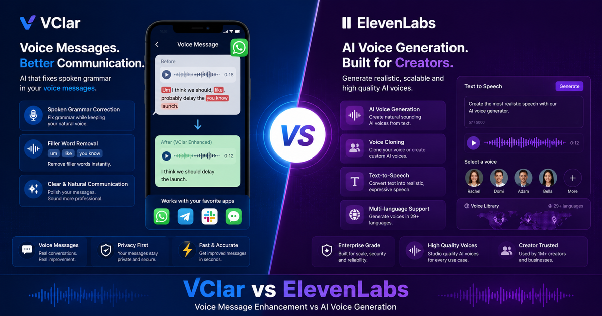
ElevenLabs is one of the most advanced AI voice generation platforms available today.
Its core product is text-to-speech: you type text, select or clone a voice, and ElevenLabs converts it into high-quality synthetic audio.
According to elevenlabs.io, the platform supports over 70 languages, offers more than 10,000 voices, and lets users clone a voice from just a few seconds of sample audio.
Beyond basic text-to-speech, ElevenLabs includes:
Audiobooks
Narration at scale without a studio session for every chapter.
YouTube & video
Voiceovers for creators who start from a script, not a raw recording.
Games & agents
Character dialogue, phone agents, and customer service tools.
What ElevenLabs is not built for: cleaning up a real voice message you just recorded.
It does not take your spoken audio, fix grammar, remove filler words, and return a polished version of your own voice. Text goes in. Synthetic voice comes out. If you start with a recording and want it improved, ElevenLabs is not the right tool.
VClar is an AI voice message enhancer that fixes grammar, removes filler words, improves clarity, and shows what changed so users can improve over time while keeping their natural voice.
It is built for the short spoken messages people send every day, not for producing synthetic narration from a script.
You recorded a WhatsApp voice message, a Slack update, or a sales follow-up, and it came out messy. Filler words everywhere. A grammar slip. Sentences that ramble. Instead of re-recording, VClar processes the audio and gives you a clean version back in your own voice.
Removes filler words like um, uh, like, and you know.
Fixes spoken grammar and tightens rambling sentences.
Shows a before-and-after comparison so you see exactly what changed.
Keeps your accent, rhythm, tone, and identity completely intact.
VClar is also a voice message translator across 13 languages (English, French, Japanese, Korean, German, Russian, Portuguese, Spanish, Italian, Chinese, Arabic, Hindi, and Danish), covering 156 one-way translation combinations.
Record in English and send a clean Spanish version in your own voice, all in one step.
It is built for WhatsApp audio, Slack updates, Telegram messages, sales follow-ups, client check-ins, founder updates, and student practice recordings.
Explore VClar at vclar.com. See pricing at vclar.com/pricing.
These are not two versions of the same tool. They travel in opposite directions.
ElevenLabs generates voice from text using a synthetic or cloned AI voice.
Your real recorded voice is not the input.
The output is audio created by the AI, not you speaking into a microphone right now.
VClar enhances voice from your real recorded audio.
Your voice is the input.
Your voice, improved, is the output, ready to send as a message.
Here is how those two different problems break down in practice:
Different use cases. Different workflows. Different outputs.
A side-by-side look at what each tool is actually built to do.
| Feature | VClar | ElevenLabs |
|---|---|---|
| Best for | Real voice messages and spoken communication | Synthetic voice generation and AI audio content production |
| Input type | Your real voice recording | Typed text |
| Output type | Cleaned real voice message, ready to send | AI-generated synthetic audio |
| Grammar correction | Yes, spoken grammar in your own voice | No — grammar is fixed in the text you type before generating |
| Filler word removal | Yes, from your real recorded audio | Not applicable — no real recorded speech to clean |
| Spoken sentence cleanup | Yes | No |
| Natural voice preservation | Yes — keep your accent, rhythm, and identity | Voice cloning replicates or reconstructs the voice |
| Translation | Yes — 13 languages, 156 combinations, in your voice | Dubbing into 90+ languages using synthetic voice clones |
| Voice generation from text | No | Yes — core feature |
| Audio output for messaging | Yes — cleaned voice message ready to send | Produced audio files for content distribution |
| Learning from corrections | Yes — shows what changed and why | No learning feedback feature |
| Use case | WhatsApp, Slack, Telegram, sales follow-ups, client updates | Podcasts, audiobooks, video voiceovers, AI agents, game audio |
| Learning curve | Low — no project setup needed | Medium — depends on use case and plan |
| Best users | Founders, salespeople, remote teams, non-native speakers, students | Content creators, developers, publishers, game studios, enterprises |
ElevenLabs makes sense when the job starts with text and ends with produced audio.
If you are building a narrated video, podcast, game, or AI agent and need a voice to deliver it, ElevenLabs has the tools for that job.
Use ElevenLabs when you are:
If your work starts with text and ends with produced audio content, ElevenLabs is a strong choice.
VClar fits the moments when you have already spoken and the message needs to be cleaner before it goes out.
No project setup. No timeline. Record, clean, send.
Use VClar when you are:
Reading about the difference is one thing. Hearing what VClar actually fixes is another.
Example 1: Founder Team Update
“So basically um I think we should maybe delay the launch because the client changed the scope and we were still waiting for final approval. I mean like they just decides to add all these extra stuffs at the very last minute, you know, and it literally don't make no sense for us to rush it right now.”
“I think we should delay the launch because the client changed the scope, and we are still waiting for final approval. They added extra requirements at the last minute, so it does not make sense to rush the release right now.”
What changed: Removed filler words, corrected tense, fixed grammar, shortened the message, and made the update clear and easy to act on.
Example 2: Sales Follow-Up Voice Message
“Hey i it's just checkings like if you would see the proposals and if we cans maybe moving forwards this week because um we is run much lates on it and i wants for make sure we doesn't miss as nothing importances you knows.”
“Hey, I wanted to check whether you saw the proposal and if we can move forward this week. We are running a little late, and I want to make sure we do not miss anything important.”
What changed: Fixed sentence structure, corrected grammar throughout, removed filler words, and made the follow-up sound professional.
Example 3: Language Learner Practice Recording
“Yesterday i go to class and teacher explain the topic but i don't understood properly like um she was talked so much fast and writes many thing on board you knows i tries for listenings to her but my brain is just like stop works completely.”
“Yesterday, I went to class, and the teacher explained the topic, but I did not understand it properly. She spoke very quickly and wrote many things on the board. I tried to listen, but my brain just stopped working completely.”
What changed: Corrected past tense throughout, fixed grammar, removed filler words, improved sentence flow, and showed the learner the exact patterns to watch for next time.
Why ElevenLabs cannot produce these outputs: these are real spoken recordings, not typed scripts.
To use ElevenLabs here, you would transcribe the recording, rewrite it as clean text, and generate a synthetic voice reading it back. That is a longer process, and the result is not your real voice.
Both tools translate, but the workflow and output are fundamentally different.
Not directly. ElevenLabs and VClar do not overlap in any meaningful way.
ElevenLabs generates synthetic audio from text for content production. VClar enhances real spoken audio for voice message communication.
If someone wants an ElevenLabs alternative for voice messages, meaning they need to improve a real recording rather than generate a synthetic one, VClar is the right answer. Not because it replaces ElevenLabs, but because ElevenLabs was never built to clean real spoken messages.
ElevenLabs is a voice production platform. VClar is a voice communication tool. Most people who need one do not need the other. Anyone who needs both uses them for completely separate tasks.
Non-native speakers face a challenge that neither ElevenLabs nor traditional writing tools fully solve. When speaking in a second language, errors happen in real time. You cannot pause and look something up.
According to research from Cambridge University Press, spoken language production in a second language is significantly more error-prone than written output because speakers have no opportunity to revise before delivery.
ElevenLabs can help generate synthetic narration in a second language from typed text. That is content production, not natural communication.
VClar corrects grammar, removes filler words, and keeps your accent and identity intact when you send a real voice message to a client or teammate.
Because it shows exactly what changed and why, users start recognizing repeated mistakes over time, a learning loop ElevenLabs was never designed to provide.
Learn more at vclar.com/fix-grammar-in-voice-memo.
These groups share one problem: they communicate a lot by voice, the stakes are real, and they rarely have time to re-record.
Founders send investor updates and team briefings. A clear message projects competence. A rambling one undermines the idea.
Sales teams live by how they come across in follow-ups. According to HubSpot, clear outreach consistently outperforms hesitant communication, and that applies to voice messages too. The filler words remover alone removes a common credibility problem.
Remote workers send async updates on Slack, Loom, or Telegram. A cleaner message means fewer misunderstandings across time zones.
ElevenLabs is useful when the job is content production: a narrated company video, an AI phone agent, or training materials with consistent narration. For the quick voice message between meetings? That is VClar's lane.
Choose ElevenLabs when you want to create something that starts with text.
A voiced piece of content. A synthetic narrator. A cloned voice for production at scale. A translated piece of media for a global audience.
Choose VClar when you have already spoken something and want it to sound better before it goes out.
A real voice message. A spoken update. Short audio that represents you to a client, teammate, prospect, or classroom.
Messy voice messages, spoken grammar mistakes, filler words, or rambling delivery? VClar.
Professional audio generated from text you wrote? ElevenLabs.