
Audio file → translated output
Upload .mp3, .aac, or .wav files and translate creative spoken content into other languages while preserving tone, cadence, and emotion.

Comparison
When people search for Adobe Firefly Translate Audio vs VClar, they are usually trying to figure out which tool fits their specific audio problem. The short version: these are not competing products fighting for the same use case. They are built for different jobs.
VClar and Adobe Firefly Translate Audio both work with spoken audio, but what each does with it is quite different.
Adobe Firefly Translate Audio is designed for translating audio files and creative spoken content — podcasts, voiceovers, training modules, and presentations — into other languages while preserving the speaker's tone, rhythm, and intent. It is a strong choice for creators, marketers, educators, and content teams who need to adapt existing audio assets for a multilingual audience.
VClar is designed for recorded voice messages that need to be cleaned, corrected, translated, and reviewed before sending. It focuses on everyday spoken communication: the WhatsApp voice note, the Slack update, the sales follow-up, the founder memo. Its job is to improve the message before it reaches the other person, not just translate the words.
If you are trying to decide between the two, the better choice depends on one key question: do you need a file-based audio localization workflow, or a voice message translation tool that cleans and improves the message before it goes out?
Audio file → translated output
Upload .mp3, .aac, or .wav files and translate creative spoken content into other languages while preserving tone, cadence, and emotion.
Recorded message → clean & translate
Clean, correct, and translate recorded voice messages before sending — with filler words removed, grammar fixed, and your natural voice preserved.
Quick answer
If you want to translate audio files, voiceovers, podcasts, training audio, presentations, or creative spoken content into another language.
If you want to translate short recorded voice messages, remove filler words, fix spoken grammar, improve clarity, and review what changed before sending.
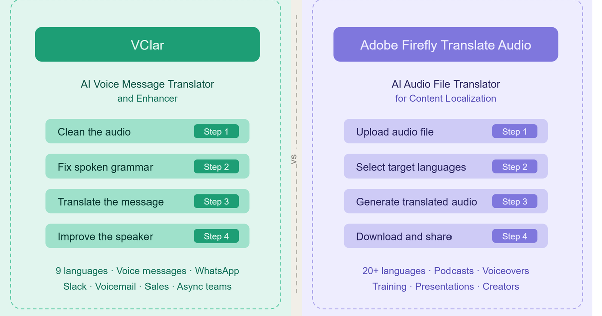
Adobe Firefly Translate Audio is an AI audio translator built into Adobe Firefly, Adobe's generative AI platform for creative work. It functions as an online audio translation tool, with no desktop software required, letting users upload a pre-recorded audio file and convert it into other languages. Whether you need to translate an MP3, AAC, or WAV file, the workflow is the same: upload, select languages, and generate. As a speech translation tool, it uses speech-to-speech AI to preserve the original speaker's voice characteristics throughout the output.
According to Adobe's official product pages, the workflow is straightforward:
Adobe states that files must be at least five seconds long and no more than ten minutes, must contain audible speech with minimal reverb or background noise, and currently support single-speaker recordings only. Files with multiple speakers taking frequent turns will produce unreliable results.
Translated files include Content Credentials, which are automatically attached to indicate that generative AI was used in the creative process. The translated file is stored in the user's queue for up to seven days, after which it is permanently deleted.
Adobe Firefly Translate Audio supports over 20 languages. According to official Adobe sources, it is designed for creators, marketers, educators, and teams who want to localize audio content, whether that means a podcast clip, a product voiceover, a corporate training module, an audiobook excerpt, or a multilingual presentation. It is part of the broader Adobe Firefly ecosystem, which also includes Translate Video and the new Generate Speech feature.
It does not currently support real-time AI audio translation. The workflow is file-based: upload first, then translate.
Adobe Firefly Translate Audio is a strong option for anyone working with audio as a content asset. If the goal is distributing existing spoken content to a broader, multilingual audience, this tool is well-suited for that job.
VClar is an AI voice message translator and enhancer that cleans, corrects, and translates short spoken messages. It removes filler words, fixes spoken grammar, improves clarity, translates across 13 supported languages, and shows what changed so users can improve their speaking over time while keeping their natural voice.
The core VClar workflow is:
Clean the audio → Fix the message → Translate the meaning → Improve the speaker
VClar is useful any time someone records a message and wants to make it clearer, more professional, and easier to understand before sending it. Unlike tools built for content production, VClar is focused on everyday spoken communication, the kind of audio that people send in WhatsApp threads, Slack channels, sales emails, client notes, and async team updates.
Here are some situations where VClar fits naturally:
VClar is not built for full podcast production, long-form audio production, video dubbing, lip-sync localization, cinematic audio localization, live meeting translation, conference interpreting, music editing, or studio-level audio mastering. Those are different problems.
VClar works as a spoken-message translator, but one that cleans and corrects before converting. That extra step is what sets it apart from tools that translate first and hand you back whatever the speaker originally said.
You can explore VClar's full capabilities at vclar.com.
Adobe Firefly Translate Audio is closer to an audio localization tool. VClar is closer to a voice message improvement tool.
Adobe Firefly Translate Audio is built for translating audio files into other languages. Its use cases are content-driven: creators who want to reach a French-speaking audience with their English podcast, educators who want to offer training modules in multiple languages, marketing teams who want to localize a product voiceover, and businesses that need to adapt audio content for global distribution. The audio is ingested as a content asset and is output as a localized content asset.
VClar is built for recorded voice messages and short spoken communication. Its use cases are message-driven: someone records a voice note, and it comes out improved. The spoken content is not content in the publishing sense; it is a message between two people or within a team. The goal is not localization. The goal is clarity, correctness, and confident communication before the message reaches the other person.
Adobe Firefly Translate Audio helps translate audio files for multilingual content. VClar helps people send clearer translated voice messages. Both tools involve spoken audio. Both involve translation. But the user problem each one solves is different enough that they rarely compete for the same job.
| Feature | VClar | Adobe Firefly Translate Audio |
|---|---|---|
| Best for | Recorded voice messages and short spoken audio | Translating audio files and creative spoken content |
| Main use case | Clean, correct, and translate voice messages before sending | Translate audio content into other languages |
| Input type | Recorded or uploaded voice message | Uploaded audio file (.mp3, .aac, .wav) |
| Output type | Cleaned, corrected, and translated the message | Translated audio output (.wav) |
| Real-time translation | No, not the main use case | No, file-based workflow |
| Audio file translation | Yes, for short spoken messages when supported | Yes, core use case |
| Voice message translation | Yes, core use case | Possible if treated as a supported audio file, but not the main positioning |
| Filler word removal | Yes | Not the main stated focus |
| Spoken grammar correction | Yes | Not the main stated focus |
| Clarity improvement | Yes | Not the main stated focus |
| Before-and-after review | Yes | Not the main stated focus |
| Natural voice preservation | Designed to keep the user's natural voice, tone, accent, rhythm, and identity | Adobe states Firefly Translate Audio preserves speaker tone, cadence, and emotion |
| Learning from corrections | Yes | Not the main stated focus |
| Supported languages | 13 (English, French, Japanese, Korean, German, Russian, Portuguese, Spanish, Italian, Chinese, Arabic, Hindi, and Danish) | Over 20 languages |
| Audio length supported | Short spoken messages | 5 seconds to 10 minutes per file |
| Best users | Non-native speakers, students, founders, salespeople, creators, remote workers, async teams | Creators, marketers, educators, content teams, and businesses localizing audio |
| Choose it when | You need to clean and translate a short spoken message before sending | You need to translate audio content for a broader audience |
Use Adobe Firefly Translate Audio when the audio content needs to reach a broader, multilingual audience.
Specifically, it is the right fit when:
Adobe Firefly Translate Audio is the better fit when audio is treated as content. The tool is designed to make that content accessible to audiences who speak a different language, while maintaining the speaker's authentic voice and delivery.
If you work inside Adobe Creative Cloud and regularly produce multilingual content, the Adobe Firefly Translate Audio feature fits naturally into that workflow.
Use VClar for personal or professional messages, not for content localization assets.
Specifically, it is the right fit when:
VClar is useful when the audio is a message between two people or within a team, not when it is a polished audio asset for public distribution. A WhatsApp voice note, a Telegram message, a Slack voice update, a sales follow-up, a client audio message — these are the situations VClar handles well.
VClar supports translate voice note workflows, translate voice memo processing, and translate voicemail use cases across its 13 supported languages.
One thing VClar does that most audio translation tools do not is clean the source message before translating it. This matters more than it might seem at first.
When you translate a spoken message directly, you are not just translating words; you are translating whatever the speaker actually said. If the original message has filler words, repeated phrases, broken grammar, or unclear structure, direct translation carries that confusion into the target language. The translated version may be technically accurate and still difficult to understand.
VClar's approach is different. It acts as an AI voice translator that first fixes what was said, then translates the fixed version. Think of it as an audio grammar fixer that runs before the translation engine. The result is a cleaned, corrected message that translates cleanly, not a messy original that carries its problems into another language.
Original voice message → cleaned message → translated message
Here is a concrete example of what that looks like in practice:
Original: "So basically um I think we should maybe send the proposal today because the client ask yesterday and we don't want to wait too much."
Cleaned: "I think we should send the proposal today because the client asked yesterday, and we should not wait too long."
The cleaned version is more direct, grammatically correct, and easy to understand. That cleaned version can then be translated more clearly into the target language, whether that is Japanese, Spanish, French, German, or any other of VClar's supported languages.
This is why VClar is useful for recorded voice messages in ways that standard audio file translators are not. It not only translates the audio. It improves the source message before translation happens. That difference matters when the message is going to a client, a manager, a colleague who speaks a different language, or a learner trying to improve their communication.
Example 1: Sales Follow-Up Voice Message
“Hey um I was just like checking if you maybe saw the proposal and if we can uh move forward this week because we are kind of running late on it.”
“Hey, I wanted to check whether you saw the proposal and if we can move forward this week. We are running a little late, and I want to make sure we do not miss anything important.”
What changed: Removed filler words, improved sentence flow, fixed clarity, and made the message sound more confident before translation or sending. A salesperson does not need to re-record this message they just send the improved version.
Example 2: Founder or Remote Team Update
“So basically I think we should maybe delay the launch because the client changed the scope and we were still waiting for final approval. I mean like they added extra stuffs at the last minute and it don't make sense to rush it.”
“I think we should delay the launch because the client changed the scope, and we are still waiting for final approval. They added extra requirements at the last minute, so it does not make sense to rush the release.”
What changed: Removed filler words, corrected grammar ("stuffs," "it don't"), shortened the update, and made the message easier for a remote team to understand. This is particularly useful for async team communication, where the listener cannot ask for clarification.
Example 3: Language Learner Voice Note
“Yesterday I go to class and teacher explain the topic but I don't understood properly because she was speaking too much fast.”
“Yesterday, I went to class, and the teacher explained the topic, but I did not understand it properly because she was speaking very quickly.”
What changed: Corrected past tense ("go" → "went," "explain" → "explained"), fixed grammar ("don't understand" → "did not understand"), improved sentence structure, and gave the learner a clearer version to study. This is why VClar is a useful tool for students and non-native speakers who want to improve their spoken communication over time.
These examples show what VClar fixes on recorded voice messages before translation or sending — a workflow Adobe Firefly Translate Audio is not built for, since it focuses on audio file translation and content localization rather than voice message cleanup.
The honest answer is: it depends on what you need.
VClar is not a direct replacement for Adobe Firefly Translate Audio for content localization, podcasts, voiceovers, or long-form audio projects. Adobe Firefly Translate Audio is better for translating audio files and creative spoken content. VClar is better described as an Adobe Firefly Translate Audio alternative for recorded voice messages, voice notes, voice memos, voicemail, and async spoken communication.
If you are a creator who needs to translate a podcast episode into Spanish and French for a broader audience, VClar is not the right tool. Adobe Firefly Translate Audio is the right tool for that.
If you are a salesperson who recorded a voice note for a client and the message is full of filler words and grammatical mistakes, Adobe Firefly Translate Audio was not built to address that problem. VClar was.
The question is not which product is generally better. The question is which product was designed to solve your specific problem.
Use Adobe Firefly Translate Audio to localize audio content. Use VClar for recorded voice messages that need cleanup, correction, translation, and review before sending.
Both tools can help creators, but they serve different stages of the creative process.
Adobe Firefly Translate Audio helps creators translate audio content for broader audiences. This is useful when the audio is already finished, such as a podcast episode, a tutorial narration, a recorded product demo, or an educational audio clip. The creator has polished content and wants to make it available to people who speak other languages. That is exactly what Adobe Firefly Translate Audio is built for.
VClar helps creators clean rough-sounding ideas before using or sharing them. A creator may record a messy voice memo for a script outline, a content hook, a caption idea, a product pitch, or a thumbnail concept. The voice memo is not content, yet it is a rough, spoken thought. VClar can remove filler words, fix grammar, improve clarity, and translate the cleaned idea if needed.
The simple distinction:
Creators who work in both stages — rough ideation and polished production — may find value in both tools for different steps of their workflow.
Both tools can help non-native speakers communicate across languages, but the type of help they offer is quite different.
Adobe Firefly Translate Audio helps non-native speakers by translating their recorded audio content into other languages. It is useful when someone wants to distribute spoken content in a language that their audience speaks better.
VClar helps non-native speakers improve how they deliver spoken messages. When VClar cleans and corrects a voice message, it shows the user exactly what changed. That kind of before-and-after visibility helps users notice patterns in their own speech over time:
For a language learner who is practicing spoken English, Spanish, French, or any of VClar's supported languages, that feedback loop has real learning value. The goal is not just to send a better message today, but to improve your speaking over time without taking a formal course.
VClar also preserves the user's natural voice, tone, accent, and rhythm. It does not replace the speaker. It cleans what they said, so they sound like a more polished version of themselves.
VClar fits naturally into any workflow where speed matters, but clarity still matters too.
Founders sending investor updates via voice message do not always have time to re-record. Salespeople leaving client follow-ups want to sound professional without spending twenty minutes on a thirty-second message. Remote teams using async voice updates across time zones need their messages to be clear on the first listen, especially when the listener speaks a different first language.
VClar supports all of these use cases:
Try VClar if any of these scenarios match your work.
Adobe Firefly Translate Audio is the better fit when the audio is a content asset — something the team produced that needs to be shared with a multilingual audience. For individual spoken communication, VClar is better suited to the job.
VClar supports voice message cleanup, spoken grammar correction, and translation workflows across 13 supported languages: English, French, Japanese, Korean, German, Russian, Portuguese, Spanish, Italian, Chinese, Arabic, Hindi, and Danish. You can view the full list on the VClar languages page.
Adobe Firefly Translate Audio supports over 20 languages, according to official Adobe product pages. According to Adobe's official sources, the supported languages include Spanish, French, German, Italian, Portuguese, Japanese, Korean, Hindi, Mandarin, and others. Adobe allows users to select up to five target languages at once from a single upload. For the most current and complete list, refer to the Adobe Firefly Translate Audio page and the Adobe Help Center.
Adobe Firefly Translate Audio and VClar are well-suited to what they are built for. The right choice depends entirely on the problem you are trying to solve.
If your main problem is audio localization for content, use Adobe Firefly Translate Audio.
If your main problem is a messy voice message with filler words, grammatical mistakes, unclear phrasing, or a translation challenge in a short recorded audio message, VClar is built for that. Check VClar pricing to see what plan fits your needs.