
Audio file → localized output
Translate audio files, dub recordings, generate subtitles, transcribe media, and localize podcasts, interviews, and training content.

Comparison
VClar and Maestra Audio Translator both work with spoken audio, but they were not built to solve the same problem. If you are comparing VClar vs Maestra Audio Translator because you are not sure which one fits your situation, the short answer is that it depends on what you are translating and why.
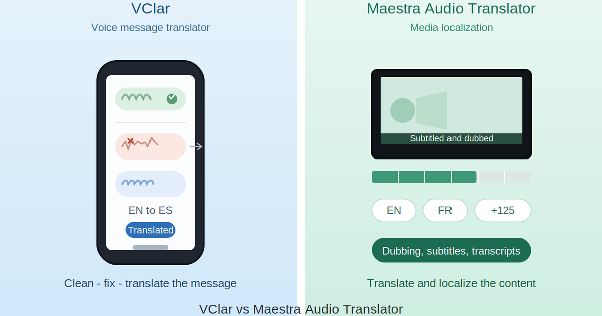
Maestra Audio Translator is built to translate audio files, dub audio and video, generate subtitles, transcribe recordings, and localize media content across many languages. It is a strong fit for podcasters, creators, educators, marketers, agencies, and media teams who need to turn spoken content into multilingual assets.
VClar is built for a different moment: the short recorded voice message you send to a person, not the long-form audio you publish to an audience. It focuses on cleaning up a voice message, improving its sound, and translating it before it reaches the other person.
So this comparison is not about which tool is "better" overall. It is about audio translator vs voice message translator, two related but different jobs, and which one matches what you are actually trying to do today. If you only remember one line from this whole page, remember this: Maestra Audio Translator is closer to an audio transcription translator, subtitle translation tool, and voiceover translator rolled into one platform, while VClar is closer to a spoken message translator that focuses on a single voice message at a time.
Audio file → localized output
Translate audio files, dub recordings, generate subtitles, transcribe media, and localize podcasts, interviews, and training content.
Recorded message → clean & translate
Clean, correct, and translate recorded voice messages before sending — with filler words removed, grammar fixed, and your natural voice preserved.
Quick answer
If you want to translate audio files, dub recordings, create subtitles, generate transcripts, or localize podcasts, interviews, videos, training content, or other media.
If you want to translate short recorded voice messages, remove filler words, fix spoken grammar, improve clarity, and review what changed before sending.
VClar is an AI voice message translator and enhancer that cleans, corrects, and translates short spoken messages. It removes filler words, fixes spoken grammar, improves clarity, translates across 13 supported languages, and shows what changed so users can improve their speaking over time while keeping their natural voice.
Its core workflow is simple: clean the audio → fix the message → translate the meaning → improve the speaker.
Maestra Audio Translator helps translate and localize audio content. VClar helps people send clearer translated voice messages.
Maestra Audio Translator is an online audio translator from Maestra, a media localization platform built around uploading and translating audio files across many languages. Based on Maestra's own product pages, the tool is positioned for:
The general workflow is file-based. You upload an audio or video file, choose the source and target language, and Maestra generates a translated output, which could be translated audio, a transcript, subtitles, or a fully dubbed voiceover, depending on which workflow you use. As an online audio translator, it lets you translate audio without installing anything, which is part of why it has become a popular choice for teams handling large volumes of multilingual content. Maestra's audio dubbing tool, for example, is also a capable AI voice dubbing solution. It lets you select from a large library of AI voices or clone the original speaker's voice, then export the result with matching timing. The broader Maestra platform also covers video dubbing, video translation, and live translation via live.maestra.ai, along with team collaboration, integrations, and API access for businesses that need to scale their localization efforts. You can review Maestra's pricing directly to see how its plans are structured around transcription, translation, and dubbing volume.
This makes Maestra Audio Translator a strong option for creators, teams, and businesses that need to turn spoken audio into multilingual content, not just a single translated sentence, but a finished asset like a dubbed podcast episode or a subtitled training video. As a full speech translation tool built for media workflows, it's designed to handle volume and variety, not just one message at a time.
VClar is an AI voice message translator and enhancer. It is built for short recorded spoken messages, not full content editing or subtitle workflows.
VClar cleans, corrects, and translates short spoken messages. It removes filler words, fixes spoken grammar, improves clarity, translates across 13 supported languages, and shows what changed so users can improve their speaking over time while keeping their natural voice.
In practice, this means VClar is useful at the exact moment someone records a message and wants it to sound clearer before sending it. Whether someone needs to translate voice messages for a client, translate voice note recordings from a study group, translate voice memo ideas before sharing them, translate voicemail left in another language, or translate WhatsApp voice messages from family abroad, the underlying job is the same: clean it up, then translate it. Some everyday examples:
This is the heart of the distinction between an audio translator and a voice message translator. Maestra Audio Translator is built around the audio file as a content asset. VClar is built around the voice message as a piece of communication that needs to land clearly with one specific person.
Maestra Audio Translator is closer to a media translation and dubbing platform. VClar is closer to a voice message improvement tool.
Maestra Audio Translator is built for audio file translation, dubbing, subtitling, transcription, and media localization. It's best for creators, marketers, educators, podcasters, training teams, agencies, and businesses, and it helps users turn spoken audio into multilingual content assets.
VClar is built for recorded voice messages and short spoken communication. It's best for voice messages, voice notes, voice memos, voicemail, and short audio updates, and it helps users clean the message before translation and before sending.
Maestra Audio Translator helps translate and localize audio content. VClar helps people send clearer translated voice messages.
| Category | VClar | Maestra Audio Translator |
|---|---|---|
| Best for | Recorded voice messages and short spoken audio | Audio translation, dubbing, transcription, subtitles, and media localization |
| Main use case | Clean, correct, and translate voice messages before sending | Translate and localize audio/video content |
| Input type | Recorded or uploaded voice message | Uploaded audio or video file |
| Output type | Cleaned, corrected, and translated the message | Translated audio, dubbed audio, subtitles, transcripts, or voiceover, depending on workflow |
| Real-time translation | No, not the main use case | Available through Maestra's live translation products, where supported |
| Audio file translation | Yes, for short spoken messages when supported | Yes, core use case |
| Voice message translation | Yes, core use case | Possible if treated as an uploaded audio file, but not the main positioning |
| Subtitles | Not the main focus | Yes, core platform feature |
| Transcripts | Used as part of the cleanup workflow | Yes, core platform feature |
| Dubbing | Not the main focus | Yes, core platform feature |
| Voice cloning | Not the main focus | Available where officially supported by Maestra |
| Filler word removal | Yes | Not the main stated focus of Audio Translator |
| Spoken grammar correction | Yes | Not the main stated focus of Audio Translator |
| Clarity improvement | Yes | Not the main stated focus of Audio Translator |
| Before-and-after review | Yes | Not the main stated focus of Audio Translator |
| Natural voice preservation | Designed to keep the user's natural voice, tone, accent, and rhythm | Maestra supports realistic AI voices and voice cloning, as officially stated |
| Learning from corrections | Yes | Not the main stated focus |
| Best users | Non-native speakers, students, founders, salespeople, creators, remote workers, async teams | Creators, marketers, educators, podcasters, agencies, media teams, businesses |
| Choose it when | You need to clean and translate a short spoken message before sending | You need translation, dubbing, subtitles, transcripts, or localization for content |
Maestra Audio Translator is the right pick when the audio you're working with will become content, not just a message to one person.
Reach for it when:
In short, Maestra Audio Translator is the better fit any time the audio is treated as a content asset, something you'll publish, share with a wider audience, or repurpose across channels rather than a personal message you're sending to one person.
VClar is the right pick when you're sending, not publishing.
Use it when:
VClar is the better fit when the audio is a personal or professional message, something meant for one recipient rather than a content localization asset meant for an audience.
This is where VClar's approach differs most from a typical audio translator. Direct translation can carry messy speech straight into another language. If the original voice message has filler words, repeated phrases, broken grammar, or unclear structure, a literal translation often preserves that confusion, just in a different language. This is the core idea behind cleaning a voice message before translation: VClar works less like a plain translator and more like a combined audio grammar fixer and voice message enhancer, focused on improving speech clarity before any language conversion occurs.
VClar's workflow handles this differently:
Original voice message → cleaned message → translated message
Here's a simple example. Original:
"So basically um I think we should maybe send the proposal today because the client ask yesterday and we don't want to wait too much."
Cleaned:
"I think we should send the proposal today because the client asked yesterday, and we should not wait too long."
Translated:
The cleaned version can then be translated more clearly into the target language, since there's no leftover filler language or grammar confusion to carry over.
This is why VClar is particularly useful for recorded voice messages. It not only translates the audio but also improves the source message first, so the resulting translation is clear in both languages. That single, clean voice message before translation is the main thing that sets VClar apart from a tool that only converts one language to another.
Example 1: Sales Follow-Up Voice Message
“Hey um I was just like checking if you maybe saw the proposal and if we can uh move forward this week because we are kind of running late on it.”
“Hey, I wanted to check whether you saw the proposal and if we can move forward this week. We are running a little late, and I want to make sure we do not miss anything important.”
What changed: Removed filler words, improved sentence flow, fixed clarity, and made the message sound more confident before translation or sending. The client receives a professional voice message rather than a hesitant, rough draft.
Example 2: Founder or Remote Team Update
“So basically I think we should maybe delay the launch because the client changed the scope and we were still waiting for final approval. I mean like they added extra stuffs at the last minute and it don't make sense to rush it.”
“I think we should delay the launch because the client changed the scope, and we are still waiting for final approval. They added extra requirements at the last minute, so it does not make sense to rush the release.”
What changed: Removed filler words, corrected grammar, shortened the update, and made the message easier for a remote team to understand.
Example 3: Language Learner Voice Note
“Yesterday I go to class and teacher explain the topic but I don't understood properly because she was speaking too much fast.”
“Yesterday, I went to class, and the teacher explained the topic, but I did not understand it properly because she was speaking very quickly.”
What changed: Corrected past tense, fixed grammar, improved sentence structure, and gave the learner a clearer version to study.
These examples show what filler word removal and spoken grammar correction actually look like in practice, not just translation, but a genuine cleanup pass before the message ever gets translated.
This deserves a careful answer because the honest version is more useful than a simple yes-or-no. Many people land on this question while comparing audio dubbing vs voice message translation, two outputs that sound similar but solve different problems, and Maestra and VClar sit on opposite sides of that line.
VClar is not a direct replacement for Maestra Audio Translator in audio dubbing, subtitles, transcription, voiceovers, or media localization. Maestra Audio Translator is better for translating and localizing audio or video content. VClar is better described as a Maestra Audio Translator alternative for recorded voice messages, voice notes, voice memos, voicemail, and async spoken communication.
So if you're searching for a Maestra Audio Translator alternative or a Maestra AI alternative for voice messages, specifically for dubbing, subtitles, transcripts, voiceovers, or multilingual content localization, Maestra Audio Translator (or a comparable media localization tool) is still the right product category to choose.
But if what you actually need is to clean up and translate a recorded voice message before sending it to a real person, that's a narrower, more specific job, and it's the one VClar is built around.
Both tools can help creators, but in different ways.
Maestra Audio Translator helps creators translate and localize audio and video content for broader audiences. This is useful for podcasts, interviews, tutorials, YouTube videos, training content, subtitles, dubbing, and voiceovers, anything meant to reach a multilingual audience at scale.
VClar helps creators clean up rough-sounding ideas before using or sharing them. A creator might record a messy voice memo for a script outline, a hook idea, a caption draft, a product thought, or a quick message to a client. VClar can remove filler words, fix grammar, improve clarity, and translate the cleaned idea, turning a rough thought into something usable.
The simplest way to think about it:
Maestra Audio Translator is useful when the audio is already content. VClar is useful when the audio is still a rough message or idea.
Both tools can help non-native speakers, but their learning value differs.
Maestra Audio Translator helps translate and localize audio content across many languages, which is valuable when you're producing or consuming media in a language you don't speak natively.
VClar helps non-native speakers improve how they convey spoken messages in day-to-day communication. It can show what changed, remove repeated filler words, correct spoken grammar, and help users notice patterns in their own speech over time, which matters if you're trying to actually get better at speaking a language, not just translate a one-off file.
Some concrete examples of this:
VClar is useful when speed matters, but clarity still matters just as much. You don't have time to re-record a voice message five times, but you also can't send something that sounds unclear or unprofessional.
Common use cases include:
Maestra Audio Translator is useful when the audio is a content asset. VClar is useful when the audio is a message that needs to be sent clearly.
VClar supports voice message cleanup and translation workflows across 13 supported languages: English, French, Japanese, Korean, German, Russian, Portuguese, Spanish, Italian, Chinese, Arabic, Hindi, and Danish. You can see the full list of supported languages on VClar's languages page.
Maestra Audio Translator's language support is broader by design, since it's built for large-scale media localization rather than one-to-one voice messages. According to Maestra's own pages, Maestra supports audio translation across 125+ languages, with realistic AI voices and voice cloning available where officially stated. This breadth is exactly why Maestra tends to come up first for audio transcription and translation queries that involve many languages, large files, or full media pipelines, rather than a single short message.
Maestra Audio Translator is the better choice for translating audio files, creating dubbed audio, generating subtitles, transcribing media, and localizing content.
VClar is the better choice for cleaning, correcting, and translating recorded voice messages before sending.
If your main problem is audio dubbing, subtitles, transcripts, voiceovers, or multilingual content localization, use Maestra Audio Translator.
If your main problem is a messy voice message, filler words, spoken grammar mistakes, unclear phrasing, or translating a short recorded audio message clearly, VClar is built for exactly that. You can get started with VClar and see how it handles your next voice message before you send it.