
Audio file → subtitles, transcript, or dub
Translate audio files into subtitles, transcripts, or dubbed audio for content, presentations, podcasts, marketing videos, or creator workflows.

Comparison
VEED Audio Translator and VClar both work with spoken audio, but they solve very different problems.
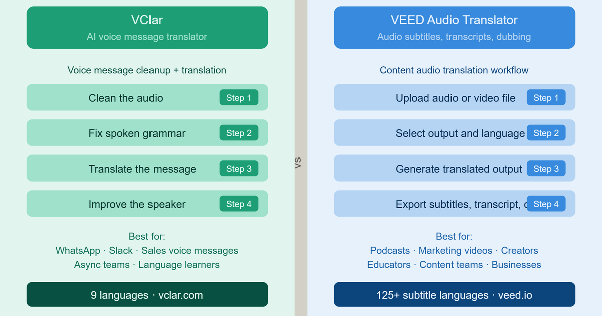
VEED Audio Translator is built for content teams, creators, podcasters, marketers, and educators who want to translate audio files into subtitles, transcripts, or dubbed audio. It is a strong browser-based tool designed around content workflows, turning existing spoken audio into multilingual content assets.
VClar is built for the other side of spoken communication: short recorded voice messages that need to be cleaned, corrected, translated, and reviewed before sending. It handles the WhatsApp voice note, the Slack update, the sales follow-up, the async team memo, and the language-learner practice recording.
If you are trying to choose between them, the decision comes down to one simple question: do you need to translate audio content, or clean and translate a voice message before sending it?
Audio file → subtitles, transcript, or dub
Translate audio files into subtitles, transcripts, or dubbed audio for content, presentations, podcasts, marketing videos, or creator workflows.
Recorded message → clean & translate
Clean, correct, and translate recorded voice messages before sending — with filler words removed, grammar fixed, and your natural voice preserved.
Quick answer
If you want to translate audio files into subtitles, transcripts, or dubbed audio for content, presentations, podcasts, marketing videos, or creator workflows.
If you want to translate short recorded voice messages, remove filler words, fix spoken grammar, improve clarity, and review what changed before sending.
VEED Audio Translator is an online audio translation tool built inside the VEED platform. According to official VEED pages, it converts audio files into subtitles, transcripts, or dubbed audio, all from a browser, with no software to install.
The core VEED Audio Translator workflow is file-based:
Based on official VEED pages, the tool claims up to 99.9% accurate subtitle translations across 125+ languages. Voice dubbing, which replaces the original spoken audio with translated speech via AI voice cloning, is available in 25+ languages, and VEED states it preserves the original speaker's tone and voice using its voice-matching technology.
VEED Audio Translator sits inside a broader creative editing platform. Once you have translated content, you can add subtitles, adjust fonts and timing, clean up background noise, resize for different platforms, and export in multiple formats. According to VEED, Pro plan users can also download transcripts in TXT, SRT, or VTT formats and access higher translation limits.
This makes VEED Audio Translator a strong choice for creators, marketers, podcasters, educators, and businesses who want to turn spoken audio into multilingual content. If you are building a translate audio online workflow for content, whether a podcast, training module, marketing video, or presentation, VEED Audio Translator is well-suited for that job.
As an audio subtitle translator and audio transcription translator, VEED fits naturally into content-first workflows. For voice dubbing, the AI matches the original voice and replaces the spoken audio with the target-language version.
VEED Audio Translator does not offer specific features for removing filler words, fixing spoken grammar, or improving message clarity before translation. Its positioning is content translation, not voice message cleanup.
VClar is an AI voice message translator and enhancer that cleans, corrects, and translates short spoken messages. It removes filler words, fixes spoken grammar, improves clarity, translates across 13 supported languages, and shows what changed so users can improve their speaking over time while keeping their natural voice.
You can learn more or try it at vclar.com.
The core VClar workflow is:
Clean the audio → Fix the message → Translate the meaning → Improve the speaker
VClar is built for everyday spoken communication, the kind that happens in real time between people, not in content editing suites. Here are the situations where VClar fits:
VClar acts as both a voice message enhancer and a spoken message translator. It cleans first, then translates, which is the step most audio translation tools skip.
VClar is not built for full podcast production, video editing, long-form audio editing, subtitle workflows, lip-sync dubbing, content localization pipelines, live meeting translation, or studio-level audio production. It handles short spoken messages, not content assets.
You can explore VClar's full capabilities at vclar.com.
VEED Audio Translator is closer to a content translation and subtitle tool. VClar is closer to a voice message improvement tool.
VEED Audio Translator treats the audio as a content asset. A podcast episode, a product voiceover, a training recording, a marketing video clip — these go in as source content and come out as multilingual content. The job is reaching a broader audience with existing material.
VClar treats the audio as a message. A WhatsApp voice note, a Slack voice update, a sales follow-up, and an async founder memo are communications between specific people, not content for an audience. The job is making the message clearer before it arrives.
VEED Audio Translator helps turn audio into subtitles, transcripts, or dubbed content. VClar helps people send clearer translated voice messages.
Both tools involve spoken audio and translation, but the user needs they solve is different enough that they rarely compete for the same job. When someone asks about an audio translator vs voice message translator, this distinction is the most important one to understand.
| Category | VClar | VEED Audio Translator |
|---|---|---|
| Best for | Recorded voice messages and short spoken audio | Translating audio files into subtitles, transcripts, or dubbed audio |
| Main use case | Clean, correct, and translate voice messages before sending | Translate audio content for content workflows |
| Input type | Recorded or uploaded voice message | Uploaded audio or video file (MP3, WAV, MP4, and others) |
| Output type | Cleaned, corrected, and translated the message | Subtitles, transcript, or dubbed audio, depending on workflow |
| Real-time translation | No, not the main use case | No, mainly file-based |
| Audio file translation | Yes, for short spoken messages when supported | Yes, core use case |
| Voice message translation | Yes, core use case | Possible if treated as an uploaded audio file, but not the main positioning |
| Subtitles | Not the main focus | Yes, core feature: 125+ languages according to VEED |
| Transcripts | Part of the cleanup and review workflow | Yes, core feature downloadable as TXT, SRT, or VTT for Pro users |
| Dubbing | Not the main focus | Yes, voice dubbing in 25+ languages with voice preservation per VEED |
| Filler word removal | Yes | Not the main stated focus of VEED Audio Translator |
| Spoken grammar correction | Yes | Not the main stated focus of VEED Audio Translator |
| Clarity improvement | Yes | Not the main stated focus of VEED Audio Translator |
| Before-and-after review | Yes | Not the main stated focus of VEED Audio Translator |
| Natural voice preservation | Designed to keep the user's natural voice, tone, accent, rhythm, and identity | VEED states voice dubbing preserves the original voice using AI voice-matching |
| Learning from corrections | Yes | Not the main stated focus |
| Supported languages | 13 (English, French, Japanese, Korean, German, Russian, Portuguese, Spanish, Italian, Chinese, Arabic, Hindi, and Danish) | 125+ for subtitles, 25+ for dubbing, per official VEED pages |
| Best users | Non-native speakers, students, founders, salespeople, creators, remote workers, async teams | Creators, marketers, educators, podcasters, content teams, businesses |
| Choose it when | You need to clean and translate a short spoken message before sending | You need subtitles, transcripts, or dubbing for audio or video content |
Use VEED Audio Translator when the audio content needs to reach a broader or multilingual audience.
Specifically, it is the right fit when:
VEED Audio Translator is the better fit when the audio is a content asset. It works particularly well when the output needs to be embedded as subtitles, used as a dubbed track, or repurposed across platforms. The VEED platform's broader tools — video translation, subtitle editing, noise removal, and export options — make it a complete content localization environment.
If you work in a content team, podcast, marketing function, or education setting and need to translate audio files into usable multilingual assets, VEED Audio Translator fits that workflow well.
Use VClar when the audio is a message, not content.
Specifically, it is the right fit when:
VClar is the right tool when the audio is a message between two people or within a team. A WhatsApp voice note, a Slack voice update, a sales follow-up to a client, a student language-practice recording, an async founder update to a remote team — these are the situations VClar handles well.
VClar supports voice messages, voice notes, voice memos, and voicemail across its 13 supported languages: English, French, Japanese, Korean, German, Russian, Portuguese, Spanish, Italian, Chinese, Arabic, Hindi, and Danish. See VClar pricing to find the plan that fits your workflow.
This is one of the key reasons VClar exists as a dedicated voice message translation tool.
When you translate a spoken message directly, you are not just translating words; you are translating whatever the speaker actually said, including every filler word, grammar mistake, repeated phrase, and broken sentence. If the original message is messy, the translation carries that mess into the target language. The listener in the other language receives a technically translated but still confusing message.
VClar's approach works differently:
Original voice message → cleaned message → translated message
Here's what that looks like with a real example:
Original: "So basically um I think we should maybe send the proposal today because the client ask yesterday and we don't want to wait too much."
Cleaned: "I think we should send the proposal today because the client asked yesterday, and we should not wait too long."
The cleaned version is direct, grammatically correct, and easy to understand in any language. When that cleaned version is then translated into Spanish, French, Japanese, or German, it produces a clear message in the target language, not a translated approximation of a rambling original.
This is the gap that most AI audio translators and audio transcription translators do not address. They translate what was said. VClar improves what was said before translation happens. That distinction matters when the message is going to a client, a manager, a colleague who speaks another language, or a learner trying to improve their communication in a second language.
For everyday voice messages, a clean voice message before translation is what turns a passable message into a confident one.
Example 1: Sales Follow-Up Voice Message
“Hey um I was just like checking if you maybe saw the proposal and if we can uh move forward this week because we are kind of running late on it.”
“Hey, I wanted to check whether you saw the proposal and if we can move forward this week. We are running a little late, and I want to make sure we do not miss anything important.”
What changed: VClar removed the filler words, tightened the sentence structure, improved overall clarity, and made the message sound more confident. A salesperson can send this message directly to a client in their own language or translated without needing to re-record. The improvement in speech clarity is immediate and visible.
Example 2: Founder or Remote Team Update
“So basically I think we should maybe delay the launch because the client changed the scope and we were still waiting for final approval. I mean like they added extra stuffs at the last minute and it don't make sense to rush it.”
“I think we should delay the launch because the client changed the scope, and we are still waiting for final approval. They added extra requirements at the last minute, so it does not make sense to rush the release.”
What changed: VClar removed filler words, corrected grammar ("stuffs" → "requirements," "it don't" → "it does not"), shortened the update, and made the message easier for a remote team to parse on the first listen. For async communication across time zones, this level of spoken grammar correction before translation makes a genuine difference; listeners cannot ask for clarification later.
Example 3: Language Learner Voice Note
“Yesterday I go to class and teacher explain the topic but I don't understood properly because she was speaking too much fast.”
“Yesterday, I went to class, and the teacher explained the topic, but I did not understand it properly because she was speaking very quickly.”
What changed: VClar corrected past tense ("go" → "went," "explain" → "explained"), fixed the grammar ("don't understand" → "did not understand"), and improved sentence structure. For a student learning to communicate in a second language, seeing what changed is part of the value it shows, which patterns to work on. This type of audio grammar-fixer feedback is useful for improvement, not just for correction.
These examples show what filler word removal and spoken grammar correction actually look like in practice — not just translation, but a genuine cleanup pass before the message ever gets translated.
The honest answer depends on what you are trying to do.
VClar is not a direct replacement for VEED Audio Translator for subtitles, transcripts, dubbing, or content localization. VEED Audio Translator is better for translating audio files into subtitles, transcripts, or dubbed content. VClar is better described as a VEED Audio Translator alternative for recorded voice messages, voice notes, voice memos, voicemail, and async spoken communication.
If your problem is content translation, subtitles, transcripts, or dubbing, use VEED Audio Translator.
If your problem is a short recorded voice message that needs cleaning, correction, and translation before it is sent, VClar is built for that.
Both tools can serve creators, but at different stages of the creative process.
VEED Audio Translator helps creators translate finished audio content for broader audiences. If you have a podcast episode recorded, a tutorial narration done, or a product demo ready, VEED can translate that audio into subtitles in 125+ languages or dub it in 25+ languages while preserving your original voice. For creators who want to grow internationally without re-recording, that is a direct workflow. It is the better fit when the audio is already content.
VClar helps creators before they produce content. A creator may record a rough voice memo for a script idea, a product hook, a caption concept, a content angle, or a quick client pitch. These recordings are not content, yet they are ideas in spoken form, and they are often messy. VClar can remove filler words, fix grammar, improve clarity, and translate the cleaned idea if the creator is working across languages.
The simple dividing line:
Creators who work across both stages may find genuine value in both tools at different points in their workflow.
Both tools can support non-native speakers, but the kind of support they provide is quite different.
VEED Audio Translator helps non-native speakers reach multilingual audiences by translating spoken content into subtitles, transcripts, or dubbed versions. If you produce audio or video content and want it to reach speakers of other languages, VEED Audio Translator makes that accessible without requiring a professional localization team.
VClar helps non-native speakers improve the way they deliver spoken messages. When VClar cleans and corrects a voice message, it shows the user exactly what changed. That before-and-after visibility builds awareness over time:
This is not just a correction — it is feedback. For someone practicing spoken English, Spanish, French, or any of VClar's supported languages, that feedback loop has real learning value. The goal is not only to send a better message today. It is to improve your speaking over time without enrolling in a formal course.
Crucially, VClar preserves the user's natural voice, tone, accent, and rhythm throughout the process. It makes you sound like a more polished version of yourself, not a different speaker.
VClar fits naturally into any workflow where speed matters, but quality still matters too.
Founders recording quick investor updates do not always have time to re-record until the message is perfect. Salespeople leaving client voice messages want to sound professional without spending twenty minutes on a thirty-second recording. Remote teams sending async voice updates across time zones need messages that land clearly on the first listen, especially when the listener's first language is different.
Here is where VClar fits into day-to-day work:
VEED Audio Translator fits where the audio is a content asset being produced for distribution. VClar fits where the audio is a message being sent to a specific person or team.
Both tools serve real, legitimate needs. The right one depends on whether the audio is content or communication.
VClar supports voice message cleanup, spoken grammar correction, and translation across 13 supported languages: English, French, Japanese, Korean, German, Russian, Portuguese, Spanish, Italian, Chinese, Arabic, Hindi, and Danish. You can view the full list on the VClar languages page.
VEED Audio Translator supports subtitles in 125+ languages and voice dubbing in 25+ languages, according to official VEED pages. VEED's dubbing languages include English, Spanish, Mandarin, Hindi, French, and others, as stated on their platform. For the complete, up-to-date list, refer to the VEED Audio Translator page.
Language range is one area where VEED clearly has broader coverage. If you need subtitles in languages not covered by VClar's nine, VEED Audio Translator is the appropriate tool for that requirement.
VEED Audio Translator is the better choice when:
VClar is the better choice when:
If your main problem is audio content localization, use VEED Audio Translator.
If your main problem is a messy voice message with filler words, grammar mistakes, or unclear phrasing that needs to be cleaned and translated before being sent, VClar is built for that.