
Video file → localized output
Translate videos with dubbing, voice cloning, lip sync, and auto-generated subtitles for multilingual audiences.

Comparison
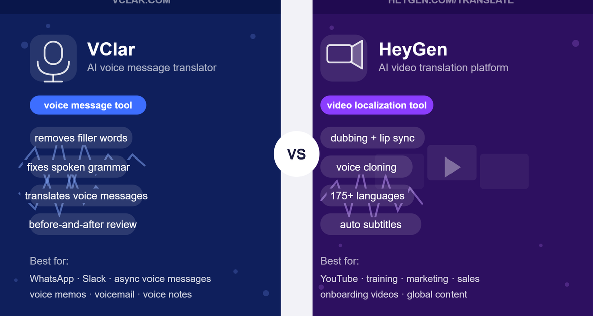
If you are comparing VClar and HeyGen Video Translation, you have probably already noticed that both tools work with spoken language. But that is roughly where the similarity ends.
HeyGen Video Translation is an AI video translator and localization platform. It is designed for creators, marketers, educators, training teams, and businesses that want to translate videos into other languages with dubbing, voice cloning, accurate lip-syncing, and auto-generated subtitles.
VClar is an AI voice message translator and enhancer. It is designed for recorded short spoken messages, voice messages, voice notes, voice memos, voicemail, WhatsApp audio, Telegram voice messages, and async team audio that need to be cleaned, corrected, translated, and reviewed before sending.
Both tools deal with spoken communication. But HeyGen Video Translation is built around video localization at scale, while VClar focuses on making individual voice messages clearer before they reach anyone.
The better choice depends entirely on what you are trying to do: translate a video or send a cleaner, translated voice message.
Video file → localized output
Translate videos with dubbing, voice cloning, lip sync, and auto-generated subtitles for multilingual audiences.
Recorded message → clean & translate
Clean, correct, and translate recorded voice messages before sending — with filler words removed, grammar fixed, and your natural voice preserved.
Quick answer
If you want to translate videos, localize video content, create dubbed videos, preserve the speaker's voice with voice cloning, and sync lip movements for multilingual audiences.
If you want to translate short recorded voice messages, remove filler words, fix spoken grammar, improve clarity, and review what changed before sending.
HeyGen Video Translation is an AI video translation and localization tool from HeyGen. It helps users translate existing videos into other languages, with a workflow built around dubbing, voice cloning, lip-syncing, and subtitling.
According to official HeyGen pages, the platform can translate videos into 175+ languages and dialects. The core idea is that you upload a video, select your source and target languages, and HeyGen handles translation, voice cloning, lip-syncing, and subtitle generation automatically.
Here is what HeyGen Video Translation is built around, based on official sources:
Video translation: Upload any video, and HeyGen translates the spoken content into the target language. According to HeyGen, users can also paste a YouTube link and translate a video without downloading it first.
AI dubbing: HeyGen offers two dubbing engines, Speed and Precision, available through HeyGen AI Dubbing. The Precision model is designed for context-aware translation with more natural lip sync and better voice matching. The Speed engine is built for fast, high-volume translation. There is also an audio dubbing option for videos where no face is visible, so lip sync is not required.
Voice cloning: According to HeyGen, its voice cloning technology captures the original speaker's tone, style, and nuances and carries that across the translated output. The result is a dubbed video that sounds like the original speaker, not a generic AI voice.
Lip sync: HeyGen's lip sync technology aligns translated speech with the speaker's facial movements at a frame level. The goal is natural synchronization, so the viewer focuses on the message rather than noticing a mismatch between voice and mouth movements.
Subtitles: Auto-generated subtitles are included in the translation workflow. Users can also add captions for accessibility.
Multi-speaker support and enterprise proofreading: HeyGen supports multi-speaker translation and offers enterprise proofreading, allowing users to review and adjust the translated script before the final video is generated.
HeyGen Video Translation is used for YouTube, training, marketing, sales, and onboarding videos, as well as global content workflows. According to HeyGen, it is trusted by over one million developers and companies and has been used to localize video content across dozens of markets simultaneously.
If you want to translate a video online and need the output to include dubbed audio, preserved voice, and synchronized lip movements, HeyGen Video Translation is a strong fit.
VClar is an AI voice message translator and enhancer, more specifically, a spoken message translator that cleans, corrects, and translates short spoken messages. It removes filler words, fixes spoken grammar, improves clarity, translates across 13 supported languages, and shows what changed so users can improve their speaking over time while keeping their natural voice.
The core VClar workflow is:
Clean the audio → Fix the message → Translate the meaning → Improve the speaker
VClar is not a video translation tool. It does not handle video dubbing, lip-sync video localization, talking avatar creation, AI avatar videos, full video production, podcast editing, or full media localization workflows. If any of those is what you need, HeyGen Video Translation is the better fit.
What VClar is built for is the gap between recording a spoken message and actually sending it. That moment when a rough first take could become a clear, professional, translated message without having to record it again.
VClar is useful when:
VClar is built for voice messages. HeyGen Video Translation is built for videos. The problems they solve and the workflows they support, differ.
This is the clearest way to understand the two products.
HeyGen Video Translation is built to translate and localize videos. The input is a finished video file (or a YouTube link). The output is a translated video with dubbed audio, voice cloning, lip sync, subtitles, and all the components of a multilingual video asset. It is best for creators, marketers, educators, sales teams, trainers, businesses, and anyone who needs to turn existing video content into multilingual video content at scale.
VClar is built for recorded voice messages and short spoken communication. The input is a short audio recording. The output is a cleaned, corrected, and translated message, without filler words and grammar errors, and ready to send. It is best for voice messages, voice notes, voice memos, voicemail, and short audio updates.
HeyGen Video Translation is closer to a video localization platform. VClar is closer to a voice message improvement tool. HeyGen Video Translation helps translate and localize videos. VClar helps people send clearer translated voice messages. The user problem is different. The workflow is different. The output is different. That is why comparing them directly on features misses the point; the right comparison is use case.
| Category | VClar | HeyGen Video Translation |
|---|---|---|
| Best for | Recorded voice messages and short spoken audio | Translating and localizing videos |
| Main use case | Clean, correct, and translate voice messages before sending | Translate videos with dubbing, subtitles, voice cloning, and lip sync |
| Input type | Recorded or uploaded voice message | Uploaded video or YouTube link |
| Output type | Cleaned, corrected, and translated the message | Translated video, dubbed video, subtitles, or lip-synced output |
| Real-time translation | No, not the main use case | No, mainly file-based video translation |
| Video translation | Not the main focus | Yes, core use case |
| Voice message translation | Yes, core use case | Not the main positioning |
| Subtitles | Not the main focus | Yes, auto-generated as part of the workflow |
| Dubbing | Not the main focus | Yes, core video localization use case |
| Lip sync | Not the main focus | Yes, AI-driven frame-level lip alignment |
| Voice cloning | Not the main focus | Yes, preserves the original speaker's tone and delivery |
| Filler word removal | Yes | Not the main stated focus of Video Translation |
| Spoken grammar correction | Yes | Not the main stated focus of Video Translation |
| Clarity improvement | Yes | Not the main stated focus of Video Translation |
| Before-and-after review | Yes, shows what changed | Not the main stated focus of Video Translation |
| Natural voice preservation | Designed to keep the user's natural voice, tone, accent, rhythm, and identity | Voice cloning preserves tone and delivery where officially stated |
| Learning from corrections | Yes, users can review and improve over time | Not the main stated focus |
| Best users | Non-native speakers, students, founders, salespeople, creators, remote workers, async teams | Creators, marketers, educators, video teams, sales teams, businesses, global content teams |
| Choose it when | You need to clean and translate a short spoken message before sending | You need video translation, dubbing, subtitles, or lip-sync localization |
HeyGen Video Translation is the right fit when the spoken language you want to translate lives inside a video.
Use HeyGen Video Translation when:
According to HeyGen, the platform offers two paths: translate an existing video with dubbing and lip sync, or create avatar videos in multiple languages from a single script. Both workflows are designed for teams that produce video content at scale and need that content to work across language markets.
HeyGen's Precision model is particularly useful when the footage is difficult, with multiple speakers, side angles, head movement, or fast-paced delivery. According to HeyGen, the Precision model applies natural lip sync even in these more complex scenarios.
If the spoken language you want to localize is already inside a video file, HeyGen Video Translation is the better tool.
VClar is the right fit when the spoken language is a short recorded message to be sent, not a video file to be localized.
Use VClar when:
VClar's clean voice message before the translation workflow gives users a moment of control between recording and sending. Instead of sending a messy first take, users can review a cleaned, corrected, and translated version before anyone hears it.
If your problem is not a video but a short recorded message, whether it is a WhatsApp audio, a Telegram voice note, a Slack update, a client voicemail, or a quick founder update, VClar is built for that.
One of the clearest differences between a video translation platform and a voice message enhancer is what happens to the source audio before translation.
When you translate spoken audio directly, the translation carries everything in the source, including filler words, broken sentences, tense errors, repeated phrases, and unclear structure. A messy voice message does not become cleaner in the target language. The confusion travels with it.
VClar takes a different approach:
Original voice message → cleaned message → translated message
Here is a concrete example:
Original: "So basically um I think we should maybe send the proposal today because the client ask yesterday and we don't want to wait too much."
Cleaned: "I think we should send the proposal today because the client asked yesterday, and we should not wait too long."
Translated: The cleaned version can then be translated clearly into Spanish, French, Japanese, or any of VClar's supported languages, without filler words, grammar errors, or vague phrasing that could confuse any recipient.
This is why VClar is described as a voice-message translation tool that improves the source before translation, rather than a tool that simply converts audio from one language to another. The audio grammar fixer step, the spoken grammar correction, and the speech clarity improvement occur before translation, making the final translated message significantly more useful to the recipient.
HeyGen Video Translation takes a different approach because the source is a video rather than a short personal message. The goal is to preserve the speaker's delivery as accurately as possible in the target language, including the original pace and tone. For video localization, this is exactly what you want. For a rough voice message full of filler words, you want something cleaned first.
Example 1: Sales Follow-Up Voice Message
“Hey um I was just like checking if you maybe saw the proposal and if we can uh move forward this week because we are kind of running late on it.”
“Hey, I wanted to check whether you saw the proposal and if we can move forward this week. We are running a little late, and I want to make sure we do not miss anything important.”
What changed: Removed filler words, improved sentence flow, fixed clarity, and made the message sound more confident before translation or sending. The client receives a professional voice message rather than a hesitant, rough draft.
Example 2: Founder or Remote Team Update
“So basically I think we should maybe delay the launch because the client changed the scope and we were still waiting for final approval. I mean like they added extra stuffs at the last minute and it don't make sense to rush it.”
“I think we should delay the launch because the client changed the scope, and we are still waiting for final approval. They added extra requirements at the last minute, so it does not make sense to rush the release.”
What changed: Removed filler words, corrected grammar throughout, clarified the update, and made the message easier for any remote team member to understand — especially useful when the message needs to be translated into another language before the team reads it.
Example 3: Language Learner Voice Note
“Yesterday I go to class and teacher explain the topic but I don't understood properly because she was speaking too much fast.”
“Yesterday, I went to class, and the teacher explained the topic, but I did not understand it properly because she was speaking very quickly.”
What changed: Corrected past tense throughout, fixed sentence structure, improved clarity, and gave the learner a corrected version to study alongside their original recording. The before-and-after review makes this a practical speaking improvement loop, not just a one-time translation.
These examples show what VClar fixes on recorded voice messages before translation or sending — a workflow HeyGen Video Translation is not built for, since it focuses on video translation and localization rather than voice message cleanup.
This is a common question, and it deserves a direct answer.
VClar is not a direct replacement for HeyGen Video Translation for video dubbing, lip sync, subtitles, voice cloning, or video localization. HeyGen Video Translation is better for translating and localizing videos. VClar is better described as a HeyGen Video Translation alternative for recorded voice messages, voice notes, voice memos, voicemail, and async spoken communication.
If you are searching for a HeyGen alternative for voice messages, specifically not for video content, VClar is built for that use case. If you need to translate and localize video content with dubbing, voice cloning, and lip sync, HeyGen Video Translation is the right tool.
Some users may need both. HeyGen Video Translation for the video content their team produces (VClar for short), recorded voice messages outside the video production workflow, client follow-ups, async team updates, WhatsApp audio, and everyday spoken communication that needs to be translated clearly.
Both tools can be useful for creators, but they serve different parts of their workflows.
HeyGen Video Translation helps creators translate and localize finished video content for broader international audiences. This is directly useful for YouTube creators, educators, course creators, training video producers, and anyone building a video library they want to distribute globally. According to HeyGen, the platform supports batch localization, so creators can upload a single video and produce translated versions for multiple markets simultaneously.
VClar helps creators clean rough-sounding ideas before using or sharing them. A creator may record a voice memo as the seed of a script, hook, content idea, caption, product thought, or client message. That recording might be clear in the creator's head, but it might be full of filler words and broken phrasing when played back. VClar can remove filler words, fix grammar, improve clarity, and translate the cleaned-up idea into another language.
HeyGen Video Translation is useful when the spoken content is already inside a finished video. VClar is useful when the spoken content is still a rough message or idea that has not yet been packaged.
For a creator who also sends voice messages to clients, collaborators, or international audiences, VClar fills a gap that a video localization platform is not designed to address.
Both tools can help non-native speakers, but the ways they help differ.
HeyGen Video Translation helps creators or businesses produce video content that sounds fluent and natural in the target language by cloning the original speaker's voice and syncing it to the translated audio. For a non-native speaker who has already recorded a video in their second language, HeyGen can help that video reach a native-language audience more naturally.
VClar helps non-native speakers improve how they deliver spoken messages in real time. When a non-native speaker records a voice message, they may make tense errors, use unclear grammar, leave in repeated filler words, or structure sentences in a way that reads differently in translation. VClar shows what changed, so the speaker does not just get a corrected output once, but can notice patterns in their speech over time.
Practical examples of what VClar corrects for non-native speakers:
For a non-native professional sending client messages, a student sending speaking practice recordings, or a remote worker sending async team audio in a second language, VClar's before-and-after review is a practical improvement loop that a video translation platform is not designed to provide.
Async voice communication has become a standard part of remote work. Founders send team updates. Salespeople follow up with prospects. Account managers check in with clients. These messages are short, informal, and usually recorded in one take, which often results in the kind of spoken messiness that makes them harder to understand.
VClar is built for this specific gap. It is useful when speed matters, but clarity still matters too.
Use cases where VClar fits for founders, salespeople, and remote teams:
HeyGen Video Translation is useful for the same types of teams when the communication is packaged as a video, an onboarding video, a training video, a product walkthrough, or a recorded sales presentation. For those assets, HeyGen Video Translation is the right tool.
For shorter spoken messages that occur outside any video production workflow, VClar is the better fit.
You can check VClar pricing to see which plan works for your use case.
VClar supports voice message cleanup and translation workflows across 13 supported languages:
English, French, Japanese, Korean, German, Russian, Portuguese, Spanish, Italian, Chinese, Arabic, Hindi, and Danish.
For the full list, see VClar supported languages.
HeyGen Video Translation supports translation into 175+ languages and dialects, according to official HeyGen pages. This includes both AI voice dubbing and synced lip movement for a wide range of languages. HeyGen's language breadth is one of its major strengths for teams that need to reach markets in less common languages.
If your use case is translating voice messages into or from English, Spanish, French, German, Japanese, Korean, Russian, Portuguese, or Italian, VClar handles those workflows well. If your use case is translating video content into a language outside VClar's supported set, Arabic, Hindi, Polish, Mandarin, or any of the other 175+ languages HeyGen supports, then HeyGen Video Translation is the tool with broader language coverage for video.
The choice between VClar and HeyGen Video Translation comes down to one question: is the communication a video, or is it a voice message?
If your main problem is video translation, dubbing, subtitles, voice cloning, or lip-sync localization, use HeyGen Video Translation.
If your main problem is a messy voice message, filler words, spoken grammar mistakes, or translating a short recorded audio message clearly before sending, VClar is built for that.
You can try VClar and review the VClar pricing page to get started.