
You speak → AI responds
Real-time spoken conversations with a powerful AI inside ChatGPT. The output is the AI's response, not a cleaned copy of your voice.

Comparison
ChatGPT Voice is one of the most talked-about AI features right now. You tap a button, speak naturally, and a highly capable AI responds in real time. For millions of people, it has replaced Google searches, replaced Siri, and changed what it means to interact with a computer through voice.
VClar does something different and more specific. It takes a voice message you already recorded, the one with the filler words, the grammar mistakes, the rambling sentence that trailed off, and gives you back a cleaner version of that same message, in your own real voice, ready to send.
These two tools both involve speaking. But they are solving completely different problems, and once you understand the difference, the choice becomes straightforward.
You speak → AI responds
Real-time spoken conversations with a powerful AI inside ChatGPT. The output is the AI's response, not a cleaned copy of your voice.
Your message in → cleaner message out
Fix grammar, remove filler words, tighten the message, and send a polished version in your own natural voice — without re-recording.
Quick answer
If you want a real-time AI conversation partner to ask questions, think through ideas, get information, or get spoken responses from a powerful AI model.
If you want to fix a voice message you already recorded, removing filler words, correcting spoken grammar, tightening the message, and sending a cleaner version in your own natural voice, without re-recording.
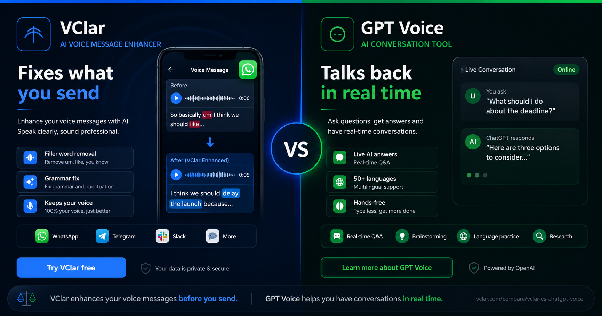
ChatGPT Voice is the spoken conversation feature built into ChatGPT. According to help.openai.com, voice conversations allow you to have a spoken dialogue with ChatGPT, enabling a more natural, conversational interaction. You can ask questions or hold discussions via voice input and receive spoken responses. It is available to all logged-in users across the ChatGPT mobile apps and on desktop at ChatGPT.com.
The feature is powered by natively multimodal models, meaning the AI processes your spoken audio directly rather than converting it to text first. This reduces latency and allows ChatGPT to respond with more natural pacing and expressiveness. According to OpenAI's release notes, as of late 2025, ChatGPT Voice is now integrated directly into the main chat interface, no separate mode required, so users can talk, watch answers appear as text, and see visuals like maps or images in real time during the same conversation.
ChatGPT Voice supports over 50 languages. It can translate between languages in real time, mid-conversation. It allows subscribers to share screens and take photos during voice sessions. It has different voice personalities available. And as a real-time AI assistant, it draws on the full intelligence of the GPT model, reasoning, problem-solving, writing help, research, and more.
What ChatGPT Voice is not built to do: clean up a voice message you want to send to someone else. The entire design is built around a live back-and-forth conversation between you and the AI. You speak, ChatGPT speaks back. The output lives inside the chat. There is no feature to take your existing spoken recording, remove the filler words, fix the grammar, and hand you back a polished audio file ready to forward to a client on WhatsApp. That is simply not what it was designed for.
VClar is an AI voice message enhancer that fixes grammar, removes filler words, improves clarity, and shows what changed so users can improve their speaking over time while keeping their natural voice.
The problem VClar solves is specific and everyday. You recorded a voice message, and it came out messy. Maybe you said "um" five times. Maybe a grammar mistake slipped in. Maybe the message rambled and lost its point halfway through. You do not want to re-record it, and you should not have to.
VClar takes that real recording and returns a cleaned-up version. Same voice. Same accent. Same rhythm. Just cleaner filler words removed, grammar corrected, sentences tightened. And it shows you exactly what changed and why, creating a feedback loop that helps you notice your own speaking patterns over time.
As a spoken-grammar correction tool, VClar is built specifically for the kind of audio that goes out fast and represents you immediately: WhatsApp voice messages, Slack updates, Telegram messages, sales follow-ups, founder briefings, client check-ins, and student practice recordings. Short messages with real stakes and no time to record again.
VClar is also a voice message translator. It supports 13 languages: English, French, Japanese, Korean, German, Russian, Portuguese, Spanish, Italian, Chinese, Arabic, Hindi, and Danish, covering 156 possible one-way translation combinations. Record in English, send a clean version in Korean, all in your own voice.
You can explore everything VClar does at vclar.com and check pricing at vclar.com/pricing.
This is the most important thing to understand, and it makes everything else clear.
ChatGPT Voice is a conversation tool. You speak to it. It speaks back. The interaction happens in real time, inside ChatGPT, and the output is a response to your question or prompt. You are the user having a conversation with an AI.
VClar is a message cleanup tool. You speak your message. VClar cleans it up. The output is a polished version of your real recording, cleaned and ready to send to another person. You are the sender preparing a communication.
These are completely different use cases:
VClar solves the second list. ChatGPT Voice solves the first. Neither replaces the other.
| Feature | VClar | ChatGPT Voice |
|---|---|---|
| Best for | Voice messages sent to other people | Real-time spoken conversations with an AI |
| Input type | Recorded or uploaded voice message | Live spoken voice during a session |
| Output type | Cleaned voice message, ready to send | Spoken AI response inside ChatGPT |
| Filler word removal | Yes, from recorded voice messages | No |
| Grammar correction | Yes, for spoken sentences in recordings | No — the AI does not correct your grammar |
| Spoken sentence cleanup | Yes | No |
| Natural voice preservation | Yes — keeps accent, rhythm, and tone | Not applicable — output is AI-generated speech |
| Voice message audio output | Yes — cleaned file to send | No — the conversation stays inside ChatGPT |
| Translation | Yes — 13 languages, 156 combinations, in your voice | Yes — real-time conversation translation |
| Works on WhatsApp / Telegram / Slack | Yes — output can be forwarded as a voice message | No — output is not a shareable audio file |
| Learning from corrections | Yes — shows what changed and why | No learning feedback on your speaking |
| Learning curve | Low — record, clean, send | Low — tap and speak |
| Best users | Founders, salespeople, remote teams, non-native speakers, students | Anyone wanting voice-first AI assistance |
ChatGPT Voice is genuinely powerful in any situation where you want to interact with a capable AI using your voice rather than your keyboard.
Use ChatGPT Voice when you are:
If your goal is to interact with an intelligent AI system using your voice, ChatGPT Voice is a strong and capable choice.
VClar is built for the moment after you have already spoken, when the message needs to be cleaner before it goes to another person. It is the best AI tool for voice messages when the stakes are real and the timeline is short.
Use VClar when you are:
No. This is one of the most important practical distinctions in the VClar vs ChatGPT Voice comparison.
ChatGPT Voice is a live conversation tool. It listens to you speak, processes what you said, and generates a response. It does not analyze, clean, or modify your speech. It does not remove the "ums" and "uhs" from your recording. It does not flag your grammar mistakes. It does not return a polished version of what you said. The output of a ChatGPT Voice session is always the AI's response, not a cleaned copy of your own voice.
If you send a rambling, filler-word-heavy voice message on WhatsApp and want it cleaned up before the recipient hears it, ChatGPT Voice cannot do that. It was never designed to. VClar is the AI grammar checker and filler-word remover for short audio messages, built specifically to solve that problem.
Not in the way most people mean when they ask this question.
You could, theoretically, open a ChatGPT Voice session, read your messy draft message out loud, and ask ChatGPT to help you rephrase it. ChatGPT would respond with a cleaner written version. You would then need to re-record your voice message using that cleaned script. That is a multi-step manual process, and the final audio is something you recorded again — it is not a cleaned version of your original.
VClar handles this in one step. Upload or record your message, and you get back a polished version of that same recording in your own voice. No re-recording. No transcribing. No extra steps. This is the difference between a workaround and a tool built specifically for the job.
Here is what VClar actually fixes on real voice messages. ChatGPT Voice produces none of these outputs — it is designed for live AI conversation, not for cleaning recorded messages.
Example 1: Founder Team Update
“So basically um I think we should maybe delay the launch because the client changed the scope and we were still waiting for final approval. I mean like they just decides to add all these extra stuffs at the very last minute, you know, and it literally don't make no sense for us to rush it right now.”
“I think we should delay the launch because the client changed the scope, and we are still waiting for final approval. They added extra requirements at the last minute, so it does not make sense to rush the release right now.”
What changed: Removed filler words, corrected tense, fixed grammar, shortened the message, and made the update clear and easy to act on. This is exactly the spoken grammar correction for founders and sales teams that VClar is built for.
Example 2: Sales Follow-Up Voice Message
“Hey i it's just checkings like if you would see the proposals and if we cans maybe moving forwards this week because um we is run much lates on it and i wants for make sure we doesn't miss as nothing importances you knows.”
“Hey, I wanted to check whether you saw the proposal and if we can move forward this week. We are running a little late, and I want to make sure we do not miss anything important.”
What changed: Fixed sentence structure, corrected grammar throughout, removed filler words, and made the follow-up sound professional and easy to act on. This is how VClar helps you make voice messages sound professional without re-recording.
Example 3: Language Learner Practice Recording
“Yesterday i go to class and teacher explain the topic but i don't understood properly like um she was talked so much fast and writes many thing on board you knows i tries for listenings to her but my brain is just like stop works completely.”
“Yesterday, I went to class, and the teacher explained the topic, but I did not understand it properly. She spoke very quickly and wrote many things on the board. I tried to listen, but my brain just stopped working completely.”
What changed: Corrected past tense throughout, fixed grammar, removed filler words, improved sentence flow, and flagged the patterns for the learner to notice next time. For anyone using an AI tool for non-native speakers to improve spoken English, this before-and-after shows what VClar's feedback loop delivers.
Notice what happened across all three examples: the meaning stayed the same, the voice stayed the same, and the message became something the listener could follow without effort. ChatGPT Voice produces none of this; it is not a message cleanup tool, and these before-and-after examples fall entirely outside its intended scope.
Both tools have translation capabilities, but they serve completely different purposes and produce completely different outputs.
ChatGPT Voice supports real-time language translation during a live spoken conversation. According to the OpenAI Voice Mode FAQ, you can verbally correct the model to speak in your language of choice during a conversation. This is a live conversational feature that enables real-time communication across language barriers. It does not produce a shareable audio file in your voice for someone else to receive.
VClar translates your real voice message into another language while keeping your own voice. You record in English, and the recipient receives a clean, natural-sounding version in Spanish, Korean, French, Hindi, or any of the 13 supported languages—all 156 one-way combinations. The message stays in your voice because it is built from your original recording.
The outputs are fundamentally different. VClar translation gives you a voice message to send. ChatGPT Voice translation helps you have a conversation in the moment. They solve different problems for different situations.
Not exactly, and it is worth being precise.
ChatGPT Voice is a real-time AI conversation assistant. VClar is a voice-message enhancement and spoken-grammar correction tool. They were not built to solve the same problem, and neither replaces the other.
Where VClar sits is in a separate category that ChatGPT Voice was never designed to cover: cleaning up real voice messages that go directly to other people, in the speaker's own voice, quickly and without production overhead. If you were looking for a ChatGPT Voice alternative specifically for improving voice messages before sending them, VClar is the right answer, not because it replaces ChatGPT's conversational intelligence, but because ChatGPT Voice was never built for that job in the first place.
The clearest framing is this: ChatGPT Voice is the AI you talk to. VClar is the AI speech polishing tool that prepares what you say before you send it to someone else.
Non-native speakers face a challenge that real-time conversation AI does not fully resolve. When you are recording a voice message in a second language, errors happen in real time. You cannot pause mid-sentence to look up a grammar rule. By the time you notice the mistake, the message is already finished.
Research from the Journal of Second Language Writing consistently shows that spoken production in a second language is significantly more error-prone than written output because speakers have no revision window before delivery. That gap is exactly where VClar operates.
ChatGPT Voice can hold a conversation in over 50 languages and can help non-native speakers practice real-time dialogue, which is genuinely useful. But the output stays inside ChatGPT. It does not clean up a real voice message and hand it back polished, in your voice, ready to send to a client on Telegram.
VClar is the more targeted AI tool for non-native speakers who are sending voice messages. It handles the spoken English grammar correction after the fact, preserves the speaker's natural accent and voice, and shows what changed so patterns become visible over time. The learning feedback is built into something ChatGPT Voice was never designed to provide. You can learn more at vclar.com/fix-grammar-in-voice-memo.
These groups share a common problem: they communicate a lot by voice, the stakes are real, and they rarely have time to re-record. VClar is the voice message cleaner for remote workers, founders, and sales teams who need messages to land clearly on the first send.
Founders record investor updates, client check-ins, and team briefings as voice messages. A polished, clear message projects competence. A rambling one filled with grammatical mistakes undermines even a strong idea. When a founder sends a voice update to a key investor or client, there is no time to open ChatGPT, talk through a cleaner draft, re-record, and then send. VClar handles it in one step.
Sales teams depend on how they come across in follow-ups. According to research published by Harvard Business Review, how we communicate, including clarity and tone, directly affects how we are perceived professionally. A clear, confident voice message performs differently from one full of hesitations. The filler word remover for short audio messages alone eliminates one of the most common credibility problems in voice-based sales outreach.
Remote workers sending async voice updates on Slack, Loom, or Telegram are broadcasting to teammates who may have no other context for a decision. A cleaner message reduces misunderstandings and cuts down on follow-up questions. As async communication has become a standard part of distributed work, the quality of those messages matters more than it used to. VClar is the practical fix for remote teams that send frequent voice updates.
ChatGPT Voice is genuinely useful to these same groups for brainstorming, for thinking through a problem on the go, for drafting ideas via voice input. But for the quick voice message that goes out between meetings? That is VClar's lane.
ChatGPT Voice is the right tool when you want to talk to an AI. Ask questions, get answers, brainstorm out loud, practice a language, or interact with a powerful AI model using your voice instead of your keyboard. It is one of the most capable real-time voice AI experiences available, and if that is what you need, it earns its place.
VClar is the right tool when you want to send a voice message to someone and make it sound like the best version of what you actually said. It removes the filler words, corrects the grammar, cleans the sentences, and gives you back your own voice in a polished form. If your problem is a messy voice message, spoken grammar mistakes, or a recording that needs to land clearly before you hit send, VClar is the AI voice message enhancer built exactly for that.
If your goal is to fix grammar in voice messages, remove filler words from audio, and make voice messages sound professional without re-recording, VClar is the answer. ChatGPT Voice was never designed for that job.