
You hit record, speak for forty seconds, and play it back, only to hear a sentence that makes it sound like your proposal finished the call and sent itself. If you've ever cringed at a voice note that went grammatically sideways, you're not alone. VClar's engine processes thousands of spontaneous voice messages daily, and dangling modifiers are one of the most common spoken patterns it encounters, not a rare slip.
You already know what you meant to say. The problem isn't your thinking, it's that speech has no backspace key. This guide will show you exactly how to fix dangling modifiers in spoken audio without re-recording, without scripting every word, and without losing your natural delivery. First, you'll learn what a dangling modifier actually is and why it happens more in speech than writing. Then, you'll see five real examples pulled from the way people actually talk in voice messages. Finally, you'll get a one-take workflow that catches and corrects these errors before anyone hears them.
Here's the part most grammar guides skip: the same cognitive mechanism that creates dangling modifiers in speech is also what makes your voice notes sound authentic. The fix isn't to suppress it, it's to clean up after it. VClar's grammar correction for voice messages does exactly that, and the surprising reason it works better than manual editing is coming up.
What Is a Dangling Modifier? And Why It Happens More in Speech
A dangling modifier is a descriptive phrase that does not logically attach to the noun that follows it, leaving the sentence to imply something the speaker never intended. In writing, you can catch it by rereading. In speech, you can't.
Think of a dangling modifier like a sticky note placed on the wrong document. The note itself is fine, it says "after finishing the call", but when you slap it onto "the proposal was sent," the reader or listener assumes the proposal finished the call. The note needs to land on "I," the person who actually did both things.
Here's the spoken version: "After finishing the call, the proposal was sent." The speaker means they finished the call and they sent the proposal. But the sentence structure hands both actions to the proposal.
Why does this happen more in voice messages than in emails? When you speak spontaneously, your brain plans the opening phrase before it has fully decided how the sentence will end. Under cognitive load, thinking about your next point, watching the clock, or speaking to a client, you restructure the sentence mid-thought. The opening modifier is already out of your mouth, so it gets stranded. Writing gives you a backspace key and a pause to reconcile the parts. Speech gives you neither.
This is not a fluency problem. It's a structural side effect of thinking in real time, and it affects even polished speakers. The difference is that in a voice note, the error is preserved exactly as it happened, and the listener hears it the same way they'd read it in a transcript.
5 Dangling Modifier Examples You'll Hear in Voice Messages
These five examples are the most common dangling modifier patterns in spontaneous voice notes. Each one shows the spoken original, the corrected version, and why the fix preserves your voice instead of flattening it.
- After finishing the call, the proposal was sent. This implies the proposal finished the call and sent itself. The fix, "After finishing the call, I sent the proposal", adds the speaker as the subject, which is the only change needed. Your tone, pacing, and emphasis stay intact.
- Walking into the meeting, the slides were already up. This sentence makes it sound like the slides walked into the meeting. Correcting it to "Walking into the meeting, I saw the slides were already up" restores the human subject without altering the observation you wanted to share.
- To improve retention, the onboarding flow was redesigned. The infinitive phrase "to improve retention" dangles because the onboarding flow didn't redesign itself. The fix, "To improve retention, we redesigned the onboarding flow", assigns the action to the team while keeping the strategic framing you intended.
- Having checked the numbers, the report looked accurate. This implies the report checked its own numbers. Correcting it to "Having checked the numbers, I found the report accurate" keeps your first-person authority and removes the logical contradiction.
- While recording the update, the mic cut out. The mic wasn't recording the update, you were. The fix, "While recording the update, I noticed the mic cut out", preserves the sequence of events and your role in noticing the problem.
Each correction follows the same pattern: add the missing subject, keep everything else. That's why VClar's filler word removal and grammar correction work together, the engine identifies the stranded modifier and reattaches it to the speaker without rewriting the message in someone else's voice. Next, you'll learn the one-take workflow that applies these fixes before you hit send.
How to Fix Dangling Modifiers in Spoken Audio: The One-Take Workflow
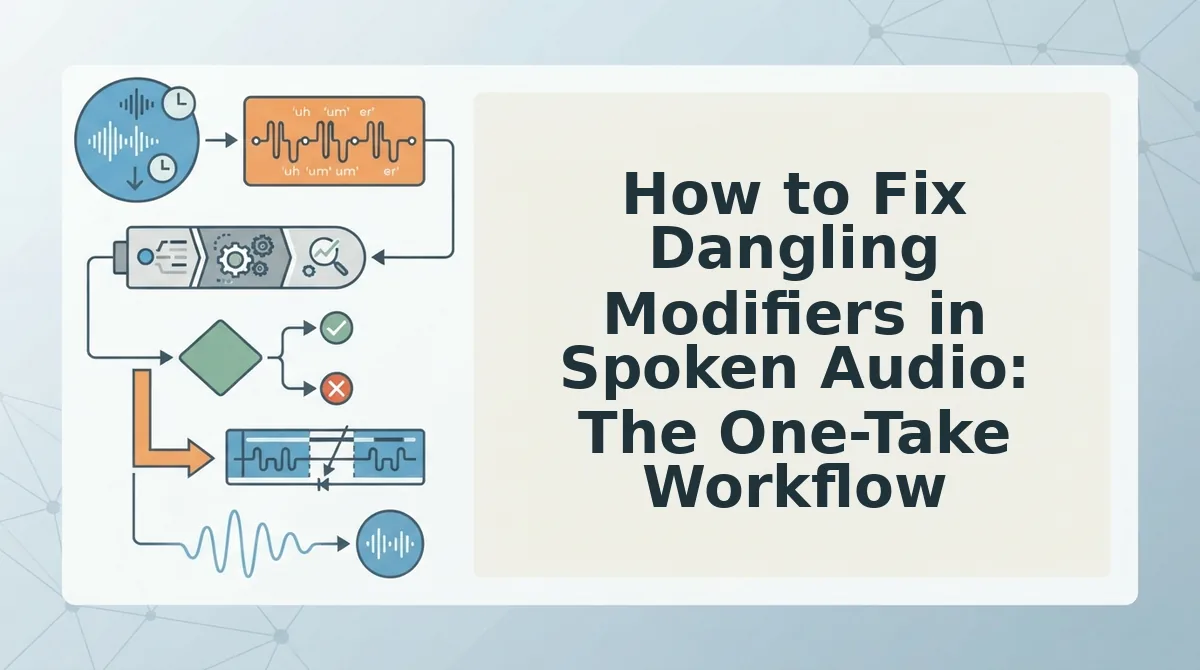
You don't fix spoken grammar by editing a transcript, you repair the audio itself. VClar's tone-preserving correction engine detects dangling phrases and repairs them while keeping your vocal timbre, accent, and cadence intact.
Prerequisites: a VClar account, a recorded voice message (or the ability to record one in-app), and a quiet recording environment. The full workflow takes under 2 minutes.
- Record or upload your voice message. Open VClar, then tap Record to capture a new message or Upload to import an existing audio file from your device. You should see the audio waveform appear on screen within seconds.
- Select the grammar correction mode. Click Settings, then choose Grammar & Clarity from the processing options. This tells VClar to fix grammar in voice messages while preserving your delivery style. You should see a confirmation badge next to the selected mode.
- Run the correction pass. Click Process Audio. VClar analyzes the timeline, identifies dangling modifiers and other spoken grammar breaks, and repairs them in the audio itself, not in a separate transcript. Expect this to take 10-30 seconds for a 60-second message.
- Review the corrected audio. Play back the processed message. You should hear the same voice, pauses, and emphasis, with the dangling phrase reattached to its subject. If you also want cleaner delivery, run the filler word remover as a second pass to strip ums and false starts.
- Export or send. Click Export to download the corrected audio or share it directly to your messaging app. A founder who records a 60-second update and realizes the grammar broke mid-sentence can upload to VClar and get corrected audio in seconds, no re-recording, no robotic text-to-speech replacement.
VClar repairs the audio timeline directly, so the corrected voice message keeps the speaker's natural pauses, emphasis, and tone. Unlike transcript-based tools, nothing is lost in translation between text and speech.
Why Text Editors Can't Fix Spoken Grammar (and What Can)
Text-based grammar checkers correct the transcript but leave the original voice message unchanged. VClar repairs the audio itself, so the corrected voice message keeps the speaker's natural pauses, emphasis, and tone.
| Tool | What It Fixes | What Happens to the Audio | Best For |
|---|---|---|---|
| Grammarly | Text grammar, spelling, clarity in transcripts | Unchanged, you must re-record or use TTS | Writers polishing written drafts |
| Descript | Transcript editing with audio sync for cuts | Edits cuts and deletions, not grammar repair in the spoken audio | Podcast and video editors trimming content |
| VClar | Spoken grammar, dangling modifiers, fillers, acoustic cleanup | Repaired in-place, preserving voice, accent, and cadence | Founders, sales teams, and creators sending voice messages |
Text editors like Grammarly correct the transcript but leave the original voice message unchanged, forcing a re-record or a robotic text-to-speech replacement. Descript is strong for cutting and rearranging spoken content, but it does not repair grammar inside the audio itself. For a deeper breakdown, see VClar vs Grammarly and VClar vs Descript.
FAQ: Dangling Modifiers in Voice Messages
Can AI fix grammar in a voice message without changing my voice?
Yes. VClar repairs spoken grammar directly in the audio timeline while preserving your vocal timbre, accent, and cadence. The corrected message sounds like you, just clearer and more grammatically sound.
How do I stop making dangling modifier mistakes when speaking?
Slow down slightly at sentence starts and mentally attach the modifier to the subject before continuing. Pausing for half a second before the main clause gives your brain time to anchor the phrase correctly.
Does VClar work with WhatsApp voice notes?
Yes. VClar works with voice messages from WhatsApp, Telegram, and other platforms. Upload the audio file or record directly in the app, process it, then send the corrected version back to your chat.
Can VClar fix grammar in voice messages in other languages?
Yes. VClar corrects spoken grammar across multiple languages and can translate voice notes while preserving the speaker's natural delivery and tone.
One Take Is All You Need
Dangling modifiers in speech are not a discipline problem. They are a signal that your brain is drafting faster than your mouth can edit. The fix is not rewriting or re-recording; it is repairing the audio with a tool that understands spoken grammar.
That changes the math. Instead of three takes to get one clean message, you record once and let VClar handle the rest.
Here is the workflow that closes the loop from the start of this article:
- Record your voice note naturally, without self-censoring mid-sentence.
- Run it through VClar to remove fillers, repair dangling modifiers, and tighten grammar.
- Send the polished message knowing your voice, tone, and cadence remain untouched.
Text editors fail here because they cannot hear the pause, the false start, or the abandoned clause. A spoken English grammar cleaner works in the audio timeline, where the error actually lives.
The next time you catch yourself saying "walking into the meeting, the agenda surprised me," do not delete the take. Run it through VClar and send it.
Spoken grammar is not a draft to be rewritten; it is a signal to be repaired, and your voice is worth keeping in the final cut.