
You spend ten minutes re-recording a 60-second voice note because conversational crutches like "basically" and "you know" undermined executive clarity. While spoken thoughts naturally stream at 150 words per minute, verbal stumbles induce a compounding 10-to-1 editing or re-recording penalty. When you learn how to strip crutch words from voice recordings, you eliminate these conversational stumbles directly without flattening your delivery or replacing human speech with synthetic voice avatars. Applying an ai voice message translator allows you to remove filler words from audio while preserving your authentic cadence, accent, and natural vocal timbre.
This guide outlines how automated speech enhancement clears spoken clutter, repairs broken phrasing, and creates one-take recording confidence. You will also discover why conventional waveform editors introduce jarring, unnatural audio gaps whenever they attempt to slice out conversational false starts.
This structured workflow resolves everyday recording friction:
- The situation: You capture a spontaneous 45-second audio update in an office, stumbling across repeated "likes" and sentence fragments.
- The action: Automated speech processing removes the crutch words, repairs broken syntax, and filters ambient background hum.
- The outcome: Your team receives a concise, decisive recording and an accurate transcript that communicates your point immediately.
Review side-by-side comparisons between your raw recordings and enhanced audio files to examine recurring speech habits, clarify your intent, and refine your spoken communication over time. However, achieving this clarity is rarely as simple as slicing out unwanted waveforms in a basic media editor.
Why Standard Audio Cutters Fail on Lexical Crutch Words
Standard audio cutters fail on lexical crutch words because deleting real words from continuous speech destroys natural breath timing and leaves audible digital seams across adjacent syllables. Hitting delete on a habit word often makes your recording sound far worse than leaving the mistake intact.
A lexical crutch word is an ordinary spoken word used unconsciously to buy thinking time rather than convey semantic meaning. Common examples include "basically," "actually," "literally," and "you know."
Acoustic fillers like "um" or "uh" occupy distinct transient frequencies with isolated pauses, making them relatively simple to cut on an audio timeline. In contrast, syntactic crutches like "basically" or "actually" are embedded directly in continuous breath groups that break grammatical structure when sliced blindly. Slicing a word out of that active breath stream clips the trailing consonants of the preceding word and truncates the attack of the following one. The resulting cut does not sound polished; it produces an unnatural audio glitch that alerts the listener to the splice.
When you speak spontaneously, your vocal cords do not shut off cleanly between phrases. The pitch continuously modulates across words, carrying personal cadence and conversational momentum.
Think of a continuous audio waveform like a knitted sweater. Snipping off an isolated fuzz ball like an "um" leaves the garment intact, but yanking out an integrated thread of yarn like "basically" unravels the tension across the entire knitted row.
Blindly cutting habit words triggers three immediate production problems:
- Spectral bleeding: Formant frequencies from the crutch word blend into adjacent vowels, leaving ghostly acoustic fragments behind.
- Rhythm collapse: Removing the word eliminates the natural cadence the human ear expects, turning an easy pause into a robotic hitch.
- Broken syntax: Mechanical deletion leaves behind awkward sentence fragments that force the listener to mentally reconstruct the speaker's meaning.
Leaving an organic stumble in the recording sounds far more credible than subjecting an audience to jagged, amateur timeline splices. To eliminate verbal crutches cleanly, software must evaluate the entire statement, protect the speaker's authentic cadence, and repair conversational grammar in a single pass. Executing this repair cleanly requires a precise, repeatable editing sequence.
How to Strip Crutch Words from Voice Recordings Step by Step
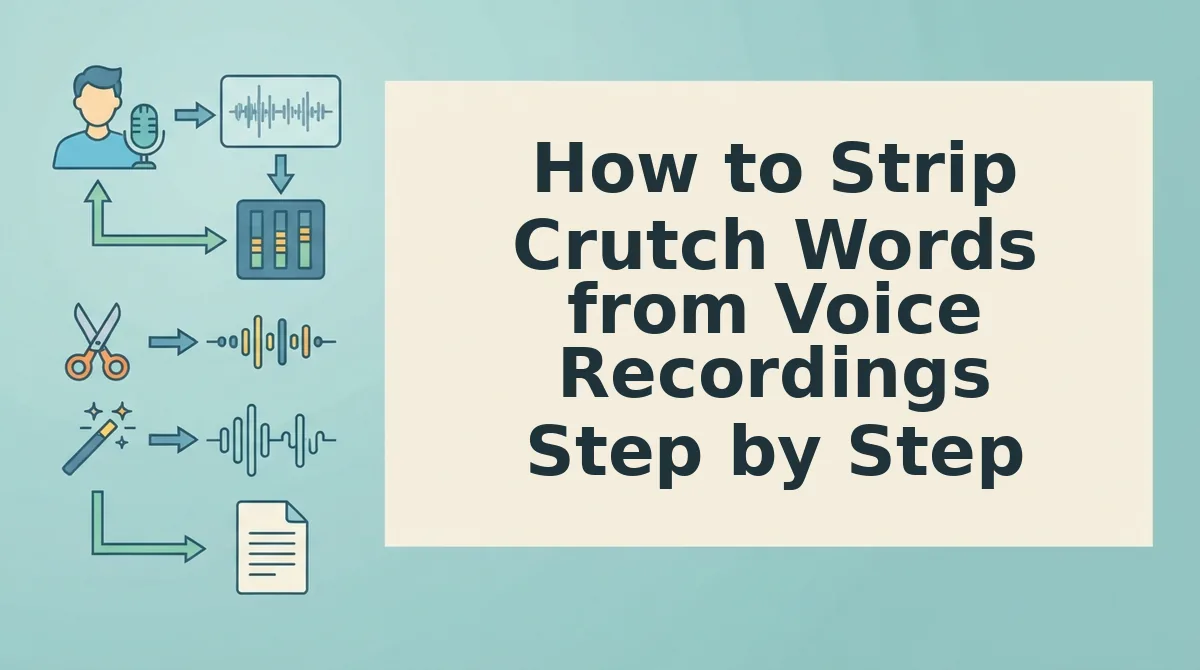
To strip crutch words from voice recordings, isolate and excise lexical fillers at zero-crossing points, apply short crossfades across cut boundaries, and reconstruct conversational pacing without synthetic voice cloning. This three-stage process eliminates verbal hesitation while preserving your natural pitch and cadence.
Consider a founder cleaning a spontaneous two-minute mobile voice memo into a crisp executive briefing ready for team distribution. Before starting, confirm you have an uncompressed audio capture (such as a WAV or high-bitrate M4A) and a speech-processing workspace with waveform-level editing controls.
Can mid-sentence edits sound completely invisible?
-
Upload your raw audio into the processing engine (Estimated time: 10 seconds).
Click Upload File, choose your spoken voice recording from your local storage, and allow the timeline to generate the speech waveform. You should see a dual-channel visual track with clearly identifiable amplitude peaks representing speech and troughs indicating pauses.
-
Isolate conversational crutches and apply boundary smoothing (Estimated time: 1 to 2 minutes).
Navigate the audio timeline to locate repeated crutches such as "basically," "you know," and trailing false starts. Zero-crossing point identification and 5ms crossfades are essential to eliminate the digital click transients created when extracting mid-sentence phrases. You should see highlighted splice markers where the filler phrase was removed, leaving an uninterrupted transition between surrounding words.
-
Export the enhanced recording and synchronized text (Estimated time: 20 seconds).
Click Export Audio, select your preferred output bitrate, and download the finished file. Listen through the exported track to confirm the dialogue flows decisively, with your authentic vocal identity intact and zero audible cut artifacts.
Manually slicing waveforms takes time that executives and operators rarely have between meetings. Streamlining this workflow through VClar gives you one-take confidence, removing filler words and repairing broken syntax without synthetic voice replacement. See how automated voice notes for founders turn rapid thoughts into clear, executive-ready audio in seconds. Understanding the performance gap between these specialized engines and legacy studio software reveals why automated processing has become essential.
Automated Speech Enhancers vs Manual DAW Waveform Slicing
Automated speech enhancers strip verbal hesitation up to forty times faster than digital audio workstations by analyzing crutch phrases contextually and restoring natural speech rhythm rather than simply slicing raw audio blocks. While manual digital audio workstation (DAW) slicing affords absolute decibel-level precision, it demands substantial technical labor and cannot restructure broken conversational grammar.
A digital audio workstation is specialized software designed for multi-track audio recording, waveform editing, and acoustic signal processing.
Audacity spectral editing requires roughly 8 to 12 minutes of manual cutting per minute of recorded audio compared to under 15 seconds with automated speech enhancers. In a traditional DAW, removing lexical crutches such as "you know" or "basically" forces editors to hunt down millisecond transients, adjust zero-crossing boundaries, and crossfade background noise to prevent jarring acoustic dropouts. Audacity requires manual Nyquist script installation or manual razor cuts that lack syntax repair capabilities, contrasting with speech enhancement engines that rebuild sentence flow. When a speaker stumbles through circular phrases or false starts, manual slicing leaves an awkward, abrupt jump cut that damages personal cadence.
| Editing Approach | Turnaround Time | Grammar Reconstruction | Best Persona |
|---|---|---|---|
| Manual DAW (Audacity / Audition) | 8 to 12 minutes per audio minute | None (leaves fragmented phrasing) | Sound engineers and audio mastering professionals |
| Timeline Studio Suites | 2 to 4 minutes per audio minute | Text-level deletions without syntax restructuring | Video creators requiring desktop timeline audio editing |
| Automated Speech Enhancers (VClar) | Under 15 seconds per audio minute | Contextual syntax repair and grammar correction | Founders, sales reps, and async business teams |
Which workflow aligns best with your production reality?
- Choose manual DAW slicing if you are a sound designer or music producer who requires precise micro-second gain staging. DAWs offer deep parameter control over spectral thresholds and multi-mic room phase alignment.
- Choose timeline studio suites if you manage serialized video podcasts and require multi-track audio scrubbing alongside rough automated transcript generation.
- Choose automated speech enhancers if you are a busy founder, remote manager, or consultant sending high-stakes spoken notes. Automated engines eliminate repetitive re-recording loops by stripping hesitation in real time.
Our recommendation: For spontaneous voice notes, client memos, and team updates, choose an automated speech enhancer. Manual waveform slicing consumes excessive time on basic cleanup tasks without addressing underlying conversational stumbles. VClar removes acoustic distractions, strips verbal crutches, and repairs spoken syntax in under 15 seconds, delivering crisp, professional voice messages while fully preserving your original vocal timbre, accent, and speaker intent. Once your audio is exported, verifying its acoustic integrity ensures your final message sounds completely unedited.

How to Check That Your Cleaned Audio Sounds Natural
To verify that cleaned voice audio sounds natural, you must audit the recording for breath continuity, pitch inflection transitions, and conversational speech velocity. Stripping crutch words should clarify your spontaneous message without flattening vocal dynamics or sounding like a synthetic text-to-speech engine.
How do you tell if an audio cleanup tool removed your bad habits or stripped out your human personality? Speech cadence is the natural rhythmic velocity and tonal timing of spoken communication. When aggressive processing truncates every hesitation, the output creates an unnatural rush that signals algorithmic tampering rather than executive clarity.
Run your processed recording through this seven-point quality audit before sending it to clients or colleagues:
- Verify conversational speech velocity: Speech pacing measures the speed of spoken delivery over time. Optimal conversational pacing sits between 140 and 160 WPM; cuts that push pacing above 185 WPM eliminate natural respiratory pauses and signal unnatural editing. Use an audio analyzer to calculate speech pace in WPM and ensure your edit remains within an approachable human range.
- Audit respiratory breath continuity: Breath continuity represents the presence of micro-inhales between dependent speech clauses. Eliminating every breath creates an uncanny vacuum that makes the speaker sound physically strained. Listen on headphones to confirm subtle, low-level inhalations still introduce complex thoughts.
- Inspect pitch inflection transitions: Inflection tracking monitors the pitch trajectory across cut points in a sentence. Splicing a filler word mid-sentence can sever natural pitch contours, resulting in jarring, stepped shifts in pitch. Play the spliced transition on loop to confirm vocal pitch rises and resolves smoothly.
- Preserve deliberate rhetorical pauses: Silence retention is the deliberate preservation of empty space around high-impact assertions. Removing every silent gap strips confidence from your statements and makes your delivery feel rushed. Check that pauses lasting half a second to a full second remain intact before key transitions.
- Check phonetic coarticulation boundaries: Coarticulation is the organic blending of adjacent phonetic sounds during fluent speech. Sloppy filler cuts often clip the trailing consonant of the preceding word or the attack of the following syllable. Zoom into the audio junction to verify that word boundaries sound complete without acoustic clicks.
- Monitor background room tone consistency: Noise floor stability is the sustained presence of ambient room frequencies across edits. Absolute digital silence dropped into a cut creates an obvious pumping effect against your environment. Monitor quiet moments in the track to confirm baseline room ambiance remains constant.
- Test mobile loudspeaker playback: Acoustic translation evaluates audio clarity on lower-fidelity output hardware. Earbuds often disguise phase artifacts and treble harshness that phone speakers accentuate. Play the exported audio file through your smartphone speaker to verify natural mid-range warmth and clear intelligibility.
If you encounter unexpected acoustic quirks during playback testing, answering a few baseline troubleshooting questions will pinpoint the issue.
Frequently Asked Questions About Removing Crutch Words
Stripping crutch words from voice recordings requires aligning spoken transcripts with acoustic timelines so verbal fillers disappear without clipping natural vocal cadence.
How do I automatically remove filler words from an audio recording?
Upload your audio file to an automated speech cleaner powered by text-aligned acoustic models. The engine transcribes the recording, detects verbal crutches such as "um" and "you know," removes the matching audio slices, and smooths the transition points so the final voice note sounds coherent in one take.
Can Audacity automatically remove crutch words from speech?
Audacity cannot natively parse language syntax without third-party plugins, whereas cloud speech processors operate on text-aligned acoustic models. In standard open-source editors, you must locate every syllable visually on the spectrogram, make manual split cuts, and adjust crossfades individually, which requires significant timeline editing for simple voice notes.
Why does audio sound choppy after cutting filler words?
Audio sounds disjointed when cuts remove ambient room tone or clip adjacent consonant decays. When manual cuts drop room tone to absolute digital silence, the sudden acoustic drop creates jarring micro-silences. Polished cleanups preserve natural speech rhythms by crossfading underlying room presence across cut boundaries.
What is the fastest way to clean voice memos on mobile?
The fastest mobile workflow eliminates manual DAW editing by processing raw voice recordings directly through a browser-based speech engine:
- Record your voice note without stopping to re-record mistakes.
- Upload the unedited memo file into a cloud-based speech cleaner.
- Export polished audio with verbal stutters and repeated starts removed.
With these practical insights in place, you can finally bypass the self-doubt that stalls your daily communication.
Stop the Re-Record Loop and Share Clean Voice Notes
Abandoning the re-record loop requires treating spoken notes as spontaneous first drafts rather than high-stakes studio performances. The most effective communicators do not stop using verbal crutches in real-time speech; they simply rely on automated processing to eliminate editing overhead while protecting their authentic vocal cadence.
Breaking the compulsion to restart recordings eliminates daily friction. Saving 15 minutes per memo equates to recapturing over 40 hours of productive communication time across an operating year.
How much cognitive momentum do you surrender every time you scrap an imperfect 60-second update?
Transitioning to an effortless, single-take workflow involves three clear actions:
- Record through conversational stumbles and pauses without tapping delete.
- Compare cleaned audio against generated transcripts to recognize recurring verbal habits.
- Review VClar pricing to integrate seamless filler removal and spoken grammar repair into your daily routine.
Authentic spoken authority comes from the clarity of your ideas, not the artificial perfection of endless re-takes.