
You record a spontaneous audio update, stumble over a sentence, hear ambient room clatter, and hit delete. Re-recording that memo three times wastes the time voice messaging was supposed to save. Deciding between vclar vs descript for quick voice notes depends on whether you need instant speech cleanup or a full production suite.
Conversational hesitations stall operators who think at 150 words per minute. This guide clarifies how each platform processes spontaneous audio, removes verbal friction, and protects authentic vocal identity. You will also discover why timeline-based editing can paradoxically slow down short async voice notes.
Can a 60-second voice memo justify launching an entire studio editor?
Take a common scenario where a founder records a project update while walking down a busy street. Processing the raw audio through an automated speech enhancer clears ambient traffic interference, eliminates verbal fillers, and repairs broken syntax without manual waveform editing. The speaker gets a polished, natural-sounding audio message ready for messaging apps in one take.
This comparison evaluates short voice messages under two minutes, excluding multi-track studio broadcasts and video editing. Examine the specific operational criteria that distinguish fast memo capture from heavy audio post-production.
Quick Voice Note Evaluation Criteria and Feature Breakdown
Evaluating tools for quick voice notes requires measuring immediate workflow velocity, automated spoken syntax cleanup, and interface friction rather than timeline-based studio editing depth. While full-scale production suites provide granular control over long-form media, short spoken notes demand immediate processing that preserves natural voice timbre without manual sequence slicing.
Standard audio production benchmarks prioritize multitrack mixing, waveform precision, and granular cutting. When applied to 45 to 90 second daily updates between colleagues or clients, those studio metrics break down completely.
The Friction-to-Send benchmark ratio is the total operational time required to record, refine, and deliver an audio message divided by the raw recording length. In daily operational communication, any tool that forces users into a desktop editor or requires manual transcript trimming introduces friction that discourages async speaking entirely.
| Evaluation Criteria | Descript | VClar |
|---|---|---|
| Core Architecture | Comprehensive audio and video studio built around text-based timeline editing. | Browser-first speech enhancer and voice message translator. |
| Setup Overhead | Project creation, media import, transcription processing, and project management. | One-take audio recording or raw upload with automated cleanup. |
| Filler Word Handling | Identifies verbal fillers for manual or batch user-approved timeline cuts. | Automatically detects and removes ums, ahs, and repeated false starts. |
| Grammar and Syntax | Requires manual text editing by the user to restructure spoken fragments. | Repairs broken conversational syntax and circular phrasing automatically. |
| Friction-to-Send Ratio | High; optimized for detailed review before final publishing. | Minimal; designed for immediate one-take voice messaging. |
| Best For | Podcasters, video editors, and content production teams. | Founders, sales representatives, and cross-border teams. |
Descript remains an industry-leading workstation for multi-track creators who need precise cut control over interviews, podcast chapters, and video timelines. If your day involves polishing forty-minute client recordings with visual assets, Descript is the correct choice.
Choose Descript if you need complete timeline editing, video screen recording, and collaborative project workspaces for polished media assets. Choose VClar if you need to record a spontaneous thought, remove hesitations, and fix grammar in voice message drafts without touching an editing track.
Our recommendation centers on operational purpose. For everyday voice messaging, we favor VClar because it handles ambient distractions, corrects conversational grammar, and delivers clean audio alongside text without forcing speakers into an editorial loop.
Examining how desktop production software processes short audio reveals why timeline editors struggle with rapid conversational notes.
How Descript Handles Short Audio Notes and Memos
Descript processes short audio notes by treating them as full studio productions, routing raw recordings through project workspaces, transcript generation, timeline sequencing, and file rendering before you can share them. Why would someone launch a full multi-track studio engine just to dispatch a sixty-second team update?
Descript is a heavy-duty audio and video editing software focused on podcast creators and studio transcription. In an evaluation of vclar vs descript for quick voice notes, Descript approaches sound capture as a document-based media editor rather than an instant voice messenger.
Descript manages short voice recordings through a dedicated project hierarchy rather than a quick memo pipeline. When an operator records audio, the system creates a multi-track timeline, synchronizes raw media with an AI-generated text transcript, and stores assets in cloud folders. While this architecture gives creators surgical, word-by-word editorial power over long-form podcasts, it requires users to create projects, wait for transcription servers, make timeline cuts, and configure export codecs just to send a brief async update. Using a heavy studio suite for spontaneous messaging is like driving a commercial semi-truck to deliver a single envelope.
Completing a simple voice update in Descript requires navigating six discrete operational steps:
- Creating a new project file within the workspace drive.
- Configuring input hardware and recording into the track timeline.
- Waiting for cloud servers to process and align the automatic transcript.
- Scanning the text editor to manually identify filler words, conversational pauses, and broken syntax.
- Applying cut operations directly across the audio waveform and timeline clips.
- Exporting the finished media asset through rendering menus before sending it to a recipient.
Timeline editing gives engineers exact control over multitrack compositions, but that project management architecture introduces friction for casual voice memos. A sender who thinks at 150 words per minute loses momentum when forced to manage project directories, transcript rendering, and asset exports for daily voice memos.
Eliminating those manual production steps requires a fundamentally different architecture built specifically for speech enhancement.
How VClar Cleans Spoken Audio and Grammar in One Take
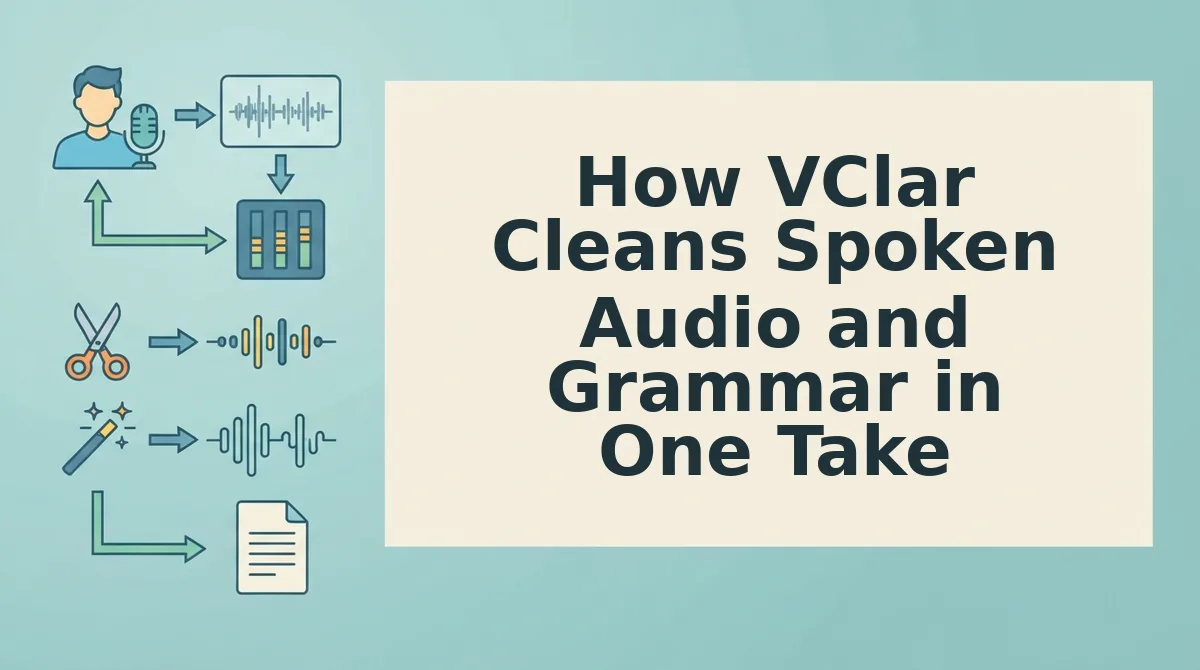
VClar cleans spoken audio and grammar in a single take by running raw voice notes through automated syntax restructuring and speech enhancement engines without manual timeline cuts. VClar is an AI voice message translator and speech enhancer that repairs broken conversational syntax and removes verbal hesitations while strictly preserving your authentic vocal identity.
To use this workflow, you only need an internet browser and an active microphone input on your computer or mobile device. No software downloads or timeline editing configurations are required.
- Record or upload your raw memo: Click the record icon on the VClar dashboard to capture an unpolished 45 to 90-second voice note, or select an existing audio file from your device storage. You will see a live audio waveform indicator confirming clear input levels without clipping.
- Run automated speech and grammar enhancement: Click the enhance button to automatically remove filler words from audio, filter ambient acoustic interference, and restructure fragmented syntax. Within five to ten seconds, the interface displays your completed voice message alongside an editable, grammatically corrected transcript.
Consider a sales follow-up memo recorded immediately after a client call. A rep speaks off-the-cuff while walking outside, producing a message cluttered with "ums," conversational false starts, and fragmented thoughts. Instead of wasting ten minutes stuck in re-recording loops or slicing waveforms in a studio editor, the rep runs the recording through VClar. The system strips the hesitations, restructures circular phrases into direct sentences, and outputs professional audio alongside an accurate transcript without replacing the speaker's vocal tone.
This automated workflow is why voice notes for founders and async teams save hours each week by replacing drafted text with one-take spoken updates. When evaluating VClar vs Descript for quick voice notes, the primary advantage is eliminating the complex production interface entirely.
Stop losing time to re-recording loops and transform your spontaneous voice memos into clear, authoritative spoken messages with VClar today.
While a browser-first one-take workflow eliminates daily messaging friction, longer multi-track studio productions introduce entirely different technical demands.
Where VClar Reaches Its Limits and When Descript Is Necessary
VClar reaches its limits when an audio project requires multi-track layer balancing, manual video timeline cuts, or surgical acoustic mastering, making Descript the mandatory platform for full-scale studio post-production. While VClar automates single-take clarity, spoken grammar repair, and filler removal for 45-to-90-second voice notes directly in the browser, it intentionally omits complex timeline editing suites. Descript is an end-to-end media editing workstation built for episodic podcasts, multi-speaker interviews, and video productions. Attempting to use a lightweight voice memo enhancer for an episodic show or polished video tutorial will inevitably fail because short-form memo processing cannot handle multi-channel production workflows.
Why force a rapid communication tool to perform like an audio engineering suite?
- Arranging multi-track recordings across separate speakers: Multi-track production requires isolating discrete microphones onto individual audio channels to balance distinct vocal levels. Spontaneous voice enhancers process unified single-speaker audio, which destroys conversational dynamics when two or more participants talk simultaneously during an interview. Import your individual microphone stems directly into Descript to align separate speaker tracks and apply automated cross-talk ducking.
- Synchronizing spoken cuts directly against video footage: Timeline video editing couples transcribed audio directly to visible screen recordings, presentations, or multi-camera video files. Single-take voice memo tools discard visual media entirely, breaking video synchronization whenever false starts or pauses are removed from the speech. Load your raw recordings into Descript's timeline editor to snip script transcriptions while automatically ripple-editing corresponding video frames in real time.
- Mastering acoustic dynamics with granular channel control: Advanced audio mastering demands surgical parametric equalization, custom compression curves, and precise frequency management across difficult room environments. Lightweight memo enhancers apply fixed automated noise reduction without giving audio engineers control over decibel thresholds or frequency bands. Route your track into Descript’s studio sound toolset and third-party plugin chain to manually dial in dynamic range adjustments.
- Preserving strategic verbal hesitations for scripted dramatic delivery: Narrative media often relies on deliberate pauses, trailing thoughts, and intentional conversational stumbles to build dramatic tension or comedic timing. Automated spoken grammar tools interpret these stylistic choices as syntax errors and systematically erase them from the final cut. Use Descript's interactive transcript view to highlight and protect specific pregnant pauses while selectively excising only accidental vocal stumbles.
Choosing between these toolsets also hinges on how each platform approaches vocal delivery under the hood.
Acoustic Timbre Preservation Versus Synthetic Voice Cloning
Acoustic timbre preservation cleans and restructures original audio while keeping the speaker's real vocal signature, whereas synthetic voice cloning synthesizes an artificial vocal model to generate new spoken audio from text. In asynchronous communication, preserving true human voice maintains recipient trust, while synthetic generation offers granular script correction at the expense of organic authenticity.
Does your recipient want to hear your real voice or a synthetic clone delivering a script?
Recipient trust in async audio communication hinges on micro-inflections, authentic regional accents, and unmanufactured cadence. When founders and consultants send voice notes, subtle acoustic nuances signal sincerity. Vocal denoising and grammar correction is an acoustic enhancement process that cuts filler words, ambient noise, and broken syntax from raw recordings while strictly preserving natural vocal timbre. In contrast, text-to-speech avatar regeneration discards the physical performance entirely, replacing it with synthesized phonemes.
Descript excels when narrative perfection matters more than personal spontaneous delivery. Its generative voice features allow creators to type corrections directly into a transcript to replace botched phrases without re-recording full podcast segments. For studio productions, this synthetic capability saves substantial reshoot time.
| Feature | VClar | Descript |
|---|---|---|
| Core Processing Engine | Acoustic denoising, filler stripping, and spoken grammar correction | Multi-track timeline editing and generative synthetic speech replacement |
| Voice Timbre Handling | Preserves original speaker cadence, accent, and natural vocal identity | Generates synthetic audio clones that approximate the speaker's tone |
| Best For | Founders, sales reps, and cross-border teams sending fast async voice memos | Podcast producers and video creators editing polished media projects |
Use this decision framework when choosing between preservation and synthesis:
- Choose VClar if you need one-take async voice memos where your natural delivery and personal authority must remain fully intact.
- Choose Descript if you produce scripted media assets and need to fix incorrect statements by generating artificial speech over a timeline.
Our recommendation for everyday business notes is to retain your organic vocal tract, because human listeners consistently respond better to natural conversational cadence than synthetic vocal avatars.
The following details address common logistical considerations for daily audio messaging.
Frequently Asked Questions About Voice Note Workflows
Choosing the right voice workflow comes down to balancing heavy timeline editing capabilities against spontaneous daily communication speed.
Is Descript practical for daily phone dictation?
Descript is not practical for quick, daily phone dictation on the go. Its project-based desktop interface introduces excessive friction when handling spontaneous 45 to 90-second voice notes. Browser-first tools process short recordings immediately, bypassing the multi-step project setups and timeline rendering queues required by studio production editors.
How do VClar and Descript handle spoken punctuation and conversational syntax?
VClar repairs broken conversational syntax automatically, whereas Descript records verbal phrasing verbatim until manually edited. Key syntax handling differences include:
- VClar: Cleans sentence fragments and circular phrasing directly in both the audio output and transcript.
- Descript: Surfaces transcription text, leaving structural syntax fixes to manual user edits or synthetic revoicing.
How do I remove filler words from audio without sounding robotic?
You remove filler words by splicing hesitation markers rather than replacing natural human speech with synthetic voice clones. VClar removes "ums," "ahs," and false starts from raw voice notes while strictly preserving your authentic vocal identity, natural speaking cadence, and personal accent across the entire cleaned recording.
Why do raw voice memos require grammar correction before sending?
Raw voice memos need grammar correction because spontaneous speech relies on sentence fragments that become confusing in written transcripts. Most professionals speak at 150 words per minute with recurring circular syntax. Polishing spoken grammar ensures quick asynchronous voice notes communicate direct executive intent to cross-border teams and clients.
Evaluating your specific volume of daily voice updates determines which processing method fits your routine.
Finding the Right Audio Workflow for Daily Communication
The operational choice between VClar and Descript rests on whether your daily communication demands rapid conversational dispatch or detailed studio production. While heavy media projects benefit from granular timeline manipulation, spontaneous async messaging collapses when dragged into complex software. The core efficiency of voice notes is velocity, yet that speed disappears when professionals spend hours re-recording unpolished audio or manually editing transcripts.
Align your workflow directly with your communicative objectives:
- Choose Descript for multi-track podcast editing, scripted marketing videos, and long-form media projects that justify manual cut points and deep timeline control.
- Choose VClar for 45- to 90-second sales updates, founder memos, and cross-border team notes that need immediate filler removal and spoken grammar correction without synthetic cloning.
To eliminate re-recording loops and communicate at full speaking speed, record a spontaneous voice message or upload an unpolished audio memo directly on VClar. Testing a raw 60-second note provides an immediate benchmark for how one-take speech enhancement preserves your authentic vocal timbre while delivering memo-ready clarity.
High-leverage async communication does not require turning every voice memo into an edited production; it requires delivering spontaneous human intent with authoritative clarity.